Best Practices Series: Making the Most of the Res Log
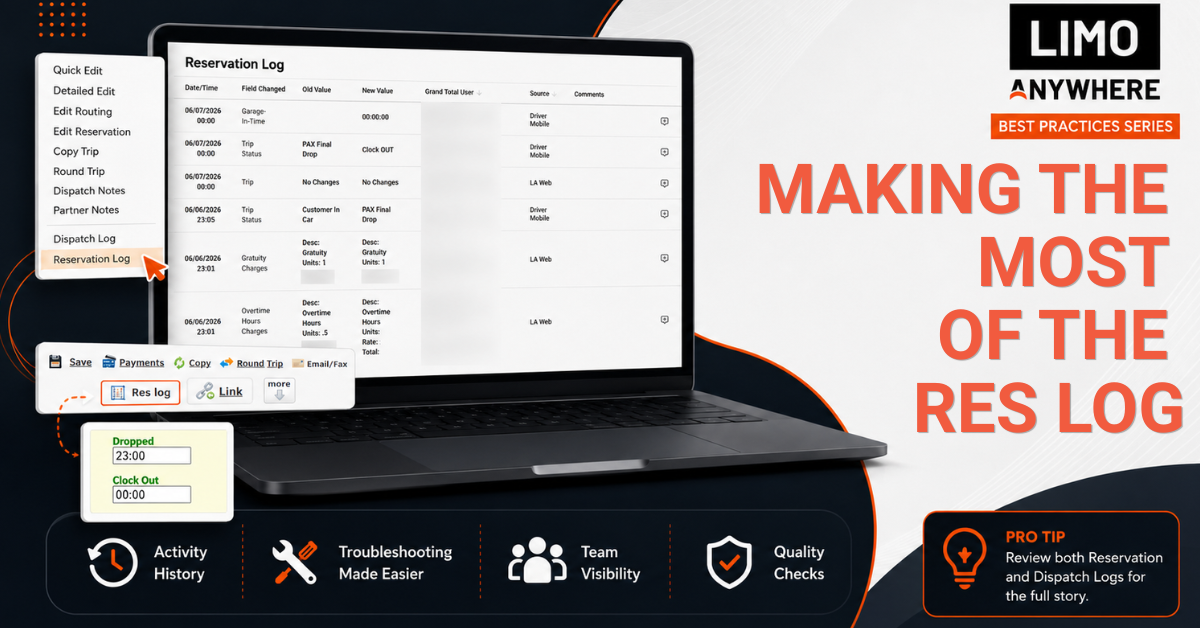
Every reservation tells a story.
A quote is created. Details are updated. A pickup time changes. A chauffeur is assigned. A payment is processed. Throughout that process, multiple team members may touch the same reservation.
That's where the Res Log becomes valuable.
The Res Log provides a detailed record of activity associated with a reservation and includes two distinct views:
- Reservation Log – Tracks changes made to the reservation itself
- Dispatch Log – Tracks dispatch-related activity and status changes
While many users turn to the Res Log only when something goes wrong, it can do much more than that. When used consistently, it becomes a powerful tool for troubleshooting, training, quality assurance, and process improvement.
Here are a few ways to get the most out of the Res Log in Limo Anywhere.
1. Start with the Res Log When Questions Arise
When investigating an issue, the Res Log is often the best place to start.
Examples might include:
- A client says their pickup time was changed
- A chauffeur arrives with outdated information
- A billing contact questions a charge
- A reservation appears different than expected
The Res Log provides a timeline of activity associated with the reservation, helping you understand what happened and when.
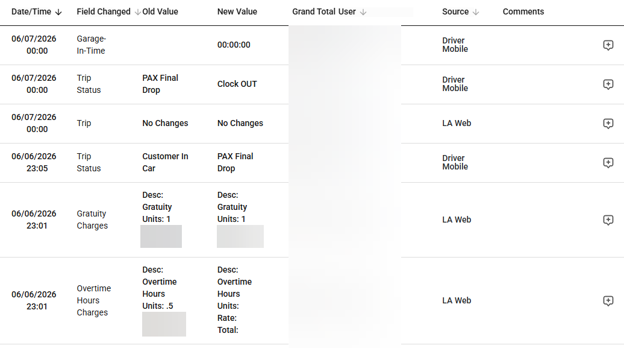
In addition to troubleshooting, the Reservation Log and Dispatch Log can also help establish timelines. For example, if you're reviewing an hourly trip and need to verify additional billable time, the Dispatch Log may show timestamped status changes such as On Location, Passenger On Board, Passenger Dropped Off, and Garage In. These records can provide valuable context when reviewing trip duration, investigating discrepancies, or supporting billing decisions.
Reviewing the Res Log first can often save time and provide a clearer picture before you begin looking elsewhere for answers.
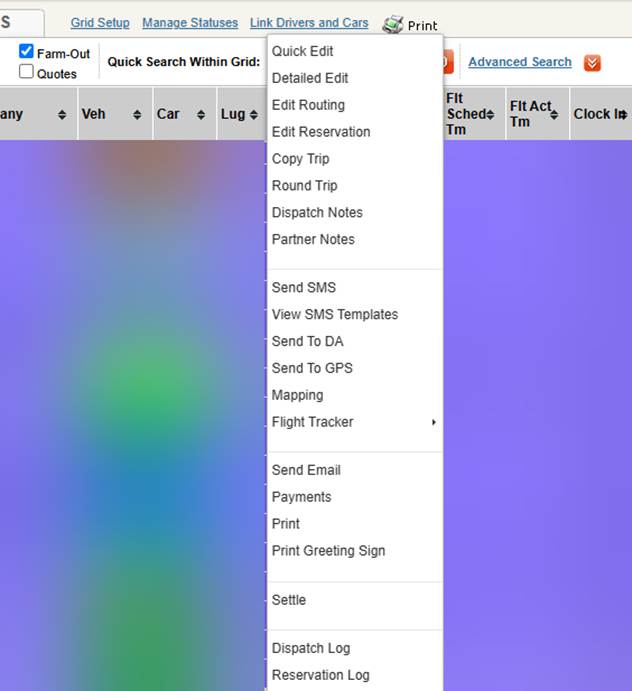
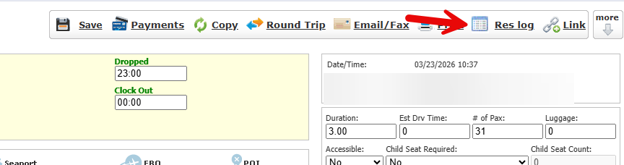
Getting to the Reservation and Dispatch Logs
From the Dispatch Grid (right click on the trip, then select Dispatch Log or Reservation Log from the drop-down menu):
From within the reservation itself (click on Res Log in the top right corner of the screen):
2. Use It to Guide Your Investigation
Not every question can be answered entirely within the Res Log—but it can often point you in the right direction.
Before diving into email threads, making phone calls, or escalating an issue, review both the Reservation Log and Dispatch Log to establish the facts.
For example, you may be able to identify:
- When a change was made
- Who made the change
- Which fields were updated
- Whether the change occurred before or after a client conversation
Even when additional research is needed, the Res Log can help narrow your search and provide valuable context. Instead of starting from scratch, you'll have a clearer picture of what happened and where to look next.
3. Turn Questions Into Training Opportunities
The Reservation and Dispatch Log can be a valuable training tool for both new and experienced employees.
For new team members, reviewing the history of an actual reservation helps illustrate how information moves through the system and how different departments interact throughout the reservation lifecycle. Instead of learning from hypothetical examples, employees can see how reservations evolve from booking to dispatch, service delivery, and billing.
When reviewing a reservation with a new team member, discuss:
- What changes were made
- Why those changes were necessary
- Whether information was entered in the appropriate place
- How different team members contributed to the reservation
- Opportunities for a more efficient workflow
The Res Log can also support refresher training and coaching for established employees. Managers, trainers, and team leads can use it to review reservations that required multiple revisions, experienced service issues, or demonstrated particularly effective handling.
By walking through the timeline of a reservation, teams can identify best practices, reinforce established procedures, and discuss opportunities for improvement. In many cases, a real-world example provides more value than a formal training exercise because employees can see how decisions and actions impact the reservation from start to finish.
4. Use It to Understand the Full Life Cycle of a Reservation
While the Res Log is valuable for reviewing individual situations, it can also provide a broader view of how reservations move through your operation.
Reservations often pass through multiple hands before the trip is complete.
A CSR may create the reservation. A dispatcher may assign a chauffeur. A manager may adjust pricing. Accounting may settle the trip. Along the way, details may be added, updated, or refined as the reservation moves through your operation.
Together, the Reservation Log and Dispatch Log provide a bird's-eye view of that entire process. Instead of looking at a reservation as it exists today, you can see how it evolved from the initial booking through completion and billing.
This broader perspective can be especially valuable when reviewing:
- High-profile reservations
- Complex event transportation
- Multi-day trips
- Reservations that required multiple revisions or special accommodations
Looking at the complete history often reveals more than any single reservation screen can show. It helps teams understand not only what changed, but how the reservation progressed through each stage of service.
5. Identify Process or Communication Breakdowns
Not every issue is caused by a mistake. Sometimes a problem reveals a gap in a process—or a breakdown in communication.
For example:
- Multiple team members updating the same field
- Frequent changes to pickup locations
- Missing information being added at the last minute
- Repeated edits to pricing or trip notes
- Reservation details being updated without being communicated to the next person in the workflow
Reviewing the Reservation Log can help uncover patterns that might otherwise go unnoticed. By looking at the sequence of updates, you may discover where information was missed, where handoffs between departments could be improved, or where a process is creating unnecessary rework.
Over time, these insights can lead to improvements in training, workflows, and internal communication. What may initially appear to be a one-time issue can often reveal an opportunity to improve consistency and efficiency across your operation.
6. Support Accountability and Quality Assurance
When multiple team members work in the same system, visibility is essential.
The Reservation and Dispatch Log provides an objective record of activity, helping teams understand:
- What changed
- When it changed
- Who made the change
That visibility supports accountability, but it can also play an important role in day-to-day quality assurance.
For example, a CSR starting their shift may review reservations created or updated by the previous shift to confirm key details are complete and accurate. A dispatcher may spot-check reservations before assigning chauffeurs to ensure important information wasn't missed. Reviewing the Res Log can provide valuable context and help verify that updates were made correctly.
This type of quality check can help teams:
- Catch missing or incomplete information
- Verify recent changes to reservation details
- Confirm that updates were entered as intended
- Identify potential issues before they impact service
In many cases, a quick review can help prevent a service failure before it occurs. By providing visibility into recent activity, it gives team members the information they need to validate reservations, support one another, and ensure everyone is working from the same set of facts
Final Thought
The Res Log is more than a troubleshooting tool.
By combining the Reservation Log and Dispatch Log, it provides visibility into how reservations move through your operation and helps teams work more efficiently, identify opportunities for improvement, and resolve questions with confidence.
Whether you're investigating a billing question, training a new employee, reviewing a complex event, or performing a quick quality check before dispatch, the Res Log can provide valuable context and insight. The more familiar your team becomes with using it, the more value you'll get from the information that's already at your fingertips.
Recent Posts

SEO & AI Search Marketing Webinar
Monday September 14, 2026
2026 CD/NLA Show
Wednesday September 2, 2026