Best Practices Series: Organizing Your Operation with Service Types, Occasions, and Groups
As your operation grows, so does the complexity of your reservations—different trip types, various client needs, seasonal peaks, multi-vehicle events, and everything in between. Staying organized in Limo Anywhere is essential, and three built-in tools can help: Service Types, Occasions, and Groups.
Used correctly, these fields do more than categorize trips—they improve workflow, simplify dispatching, and give you more useful reporting insights. Here’s how to make them work for you.
1. Use Service Types to Define the Structure of the Trip
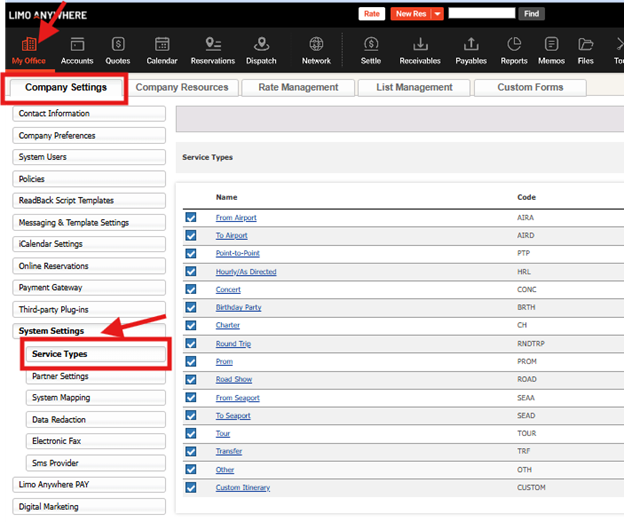
The Service Type field identifies how a reservation is priced and delivered—Hourly, Point-to-Point, Airport Transfer, Roadshow, etc.
Best practices:
- Keep the list clean—remove outdated or rarely used service types
- Use descriptive, easy-to-understand names (e.g., “Hourly – Wedding” or “P2P – Hotel to Venue”)
- Configure pricing and required fields for each type to ensure accurate quotes and billing
- Tie vehicle types to service types to simplify booking and dispatch workflows
A thoughtfully configured Service Type list makes your reservation process faster and more accurate—and improves the quality of your reporting.
2. Use Occasions to Capture the Purpose or Context of the Trip
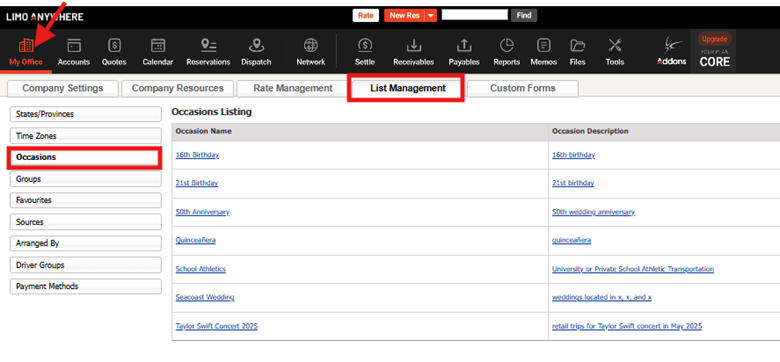
The Occasion field captures why the trip is happening—not just personal milestones like Weddings, Proms, or Birthdays, but also broader public events and seasonal trends.
Best practices:
- Standardize your Occasion options to avoid confusion (e.g., always use “Prom” instead of “HS Dance” or “Senior Night”)
- Include shared public events or seasonal offerings like “Indy 500,” “Holiday Lights Tour,” or “Concert Shuttle – Taylor Swift”
- Apply the Occasion to each reservation even when trips are booked by different clients—it allows for grouped reporting, demand forecasting, and marketing follow-up
Filtering by Occasion gives you valuable insight into trends and helps you prepare for recurring busy seasons, even when trips are not linked to the same account.
3. Use Groups to Coordinate Multi-Vehicle or Multi-Day Events
The Group field is ideal for linking reservations that are all part of the same event, especially when coordinating multiple vehicles across different times, days, or service types for a single client.
Best uses:
- Large weddings with ceremony, reception, and guest shuttles
- Corporate conferences with airport transfers, hotel shuttles, and gala events
- Athletic team or entertainment group travel with multiple days of transportation
Best practices:
- Create a consistent naming convention like “Smith Wedding 10/12” or “Acme Summit 2025”
- Assign the same Group to every reservation connected to the event
- Use Group filters in the Reservation and Reports modules to manage logistics, billing, and client communication as a package
Groups help your team stay coordinated behind the scenes—and give the client a seamless, professional experience.

Final Thought:
If Service Types tell you what the trip is, Occasions explain why it’s happening, and Groups reveal how it fits into a larger plan. Together, these fields form a powerful system for organizing your workflow, improving client service, and gaining insight into what’s really driving your business.
Recent Posts
2026 CD/NLA Show
Wednesday September 2, 2026
Customizing Your Lead Form
Monday August 17, 2026