Understanding and Configuring Occasions in Limo Anywhere
Recently we introduced the use of occasions, service types, and groups in our Best Practices series. In this post, we’ll take a deeper dive into how to make the Occasions tool work for your business.
Efficiency and organization matter in every aspect of your operation, whether you are managing a handful of reservations each week or coordinating hundreds of travelers. One feature that often goes underutilized in Limo Anywhere is Occasions. While it may seem like a small data point, using Occasions consistently can unlock stronger reporting, better insights, and more targeted marketing opportunities over time.
Occasions vs. Groups vs. Sources vs. Service Types
Limo Anywhere provides multiple ways to categorize and organize reservations. While these tools may feel interchangeable, each one serves a different purpose.
- Sources: How the booking came to you
Examples: Website, Google Ads, Hotel Concierge, Referral Partner - Occasions: Why the client is traveling
Examples: Wedding, Prom, Birthday, Holiday Party - Groups: Which reservations belong together
Examples: Maximoff Family Reunion 2026, S.H.I.E.L.D. Regional Meeting Q1 2026 - Service Types: How the reservation is priced and operationally handled
Examples: Airport Transfer, Hourly Charter, Night on the Town
One of the key differences between Service Types and Occasions is that Service Types are operational, while Occasions are informational.
If a type of trip requires different pricing rules, minimums, or billing logic, that distinction belongs in a Service Type. If the trip behaves the same operationally but you still want to track the reason for it, that is where an Occasion comes in.
For example, you might not receive enough Bachelor or Bachelorette Party bookings to justify creating a separate Service Type. Instead, those trips might all fall under a broader Service Type like “Night on the Town,” while the Occasion captures the specific reason for the outing.
Examples of Occasions
Occasions capture the reason a client is booking transportation. They are broad, reusable categories that describe the type of event or milestone being celebrated.
Common examples include:
- Wedding
- Prom
- Birthday
- Anniversary
- Holiday Party
- Concert
- Sporting Event
Occasions give you more meaningful insight into your bookings. Rather than focusing only on dates, vehicles, and revenue, you can start identifying patterns in the types of events you serve most often, how those bookings shift seasonally, and which trips tend to generate higher revenue.
Adding An Occasion
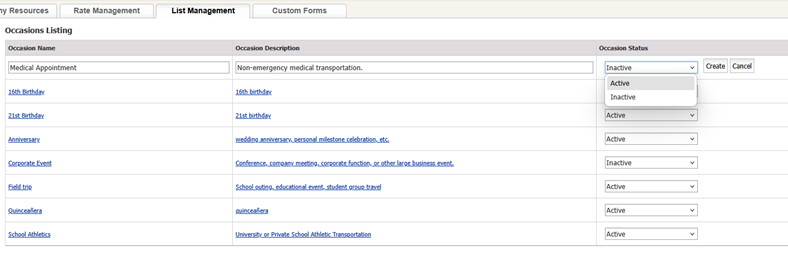
Limo Anywhere does not include pre-populated Occasions, which allows you to customize them based on how your clients book and the services you prioritize.
- Click the “My Office” icon in the navigation bar.
- Navigate to the “List Management” tab.
- Select “Occasions” from the left-hand menu.
- Click “Add New Occasion” in the top right corner.
- Enter the Occasion Name and a short description.
- Set the status drop-down to “Active.”
- Click “Create” to save.
Try to keep your Occasion list intentional. Too many overlapping or overly specific options can make reporting more difficult later.
Editing or Deactivating an Occasion
- Click the hyperlink for “Occasion Name” or “Occasion Description”.
- Make the desired changes.
- Click “Update” to save.
If an Occasion is no longer relevant, you can deactivate it.
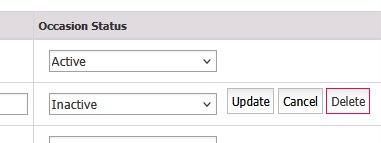
NOTE: Deleting an Occasion removes your ability to report on it historically. If you want to preserve past data while preventing future use, set the status to “Inactive” instead of deleting it.
Using Occasions in Reporting and Analytics
Occasions become most useful when paired with reporting.
Several Limo Anywhere reports allow you to filter by Occasion, helping you analyze performance by event type instead of just by date or vehicle.
Sales Revenue Report
Occasions become most useful when paired with reporting.
Several Limo Anywhere reports allow you to filter by Occasion, helping you analyze performance by event type instead of just by date or vehicle.
- Total revenue
- Number of trips
- Total hours
- Average rate per trip
You can combine Occasion filters with others like vehicle type, chauffeur, specific vehicle, or cancellation status to get more detailed insights.
If you export this report in MS Excel format, it will also include passenger email addresses. This can be useful for targeted marketing, such as following up with past holiday party clients or reminding families about prom season.
Reservation Manifest
Occasions are also useful for operational planning.
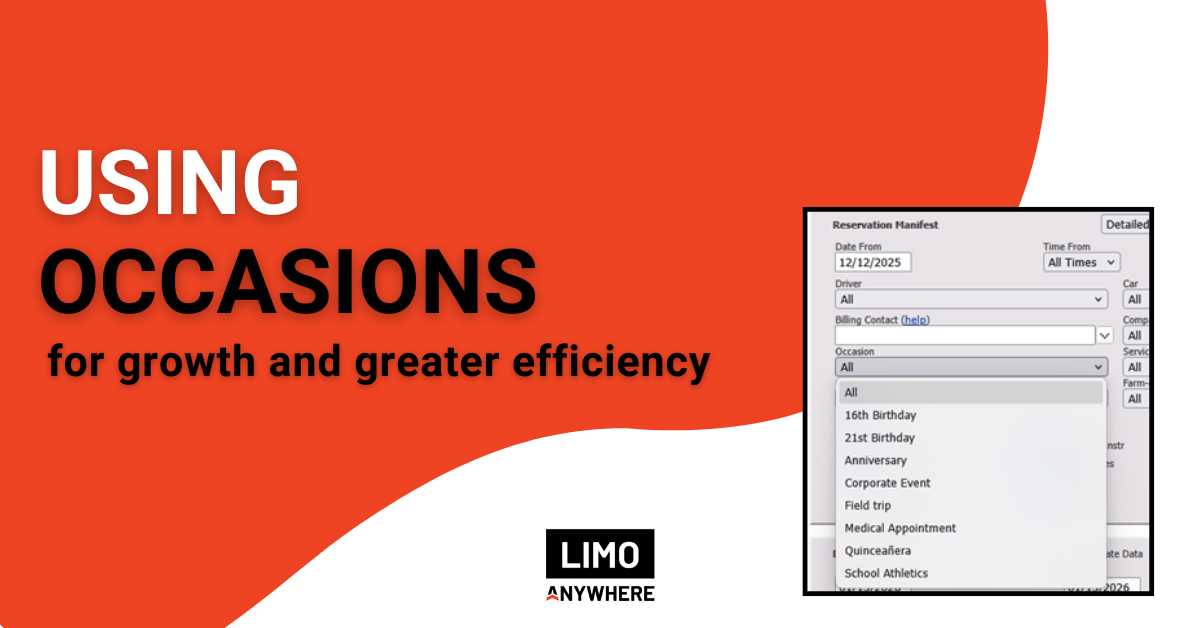
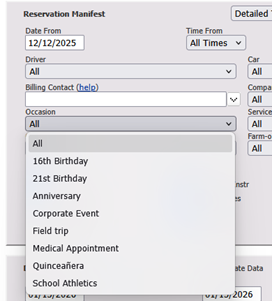
For large or recurring events, you can generate a Reservation Manifest filtered by Occasion. This allows you to see all upcoming trips tied to that category within a specific timeframe.
For example, you might generate a manifest for all wedding-related trips during a busy weekend, or all airport transportation related to a major conference.
If you have questions about setting up Occasions or want help reviewing how they are being used in your system, the Limo Anywhere Support team can assist. Support is available from 7 AM to 7 PM CT and can be reached by phone at 972-701-8887 ext. 2 or by email at Support@LimoAnywhere.com.
Tell us how you are using Occasions in your own operation and share any tips or tricks you have picked up along the way. Join the conversation with other Limo Anywhere users on Facebook.
Recent Posts

2026 CD/NLA Show
Wednesday September 2, 2026
Customizing Your Lead Form
Monday August 17, 2026