Limo Anywhere · Custom Booking Portals
Give your best accounts an easier way to book.
Create a branded reservation experience for corporate teams, hotel concierges and events. Choose the booking options that fit the account, then let reservations flow into Limo Anywhere.
Available on Limo Anywhere Plus and Black · Hosted booking link or website embed
How it works
Set your branding, permitted accounts, vehicle types, destinations and booking rules.
Share the generated booking link—or embed the same portal in a webpage you manage.
Portal bookings arrive in Limo Anywhere for your established reservation and dispatch process.
Logo, header image, labels and supported co-branding options.
Approved bookers, vehicles, payment choices and saved locations.
Trip creation, permissions, notifications and account tools.
Business development opportunities
Three accounts. Three ways to make booking simpler.
Give an important client a direct way to book transportation, with the accounts, services and reservation details that fit the relationship.
Help travel coordinators book for their teams.
A corporate account can use a dedicated portal link with authorized account selection, appropriate vehicle choices, office locations and booking contact information.
What to show in a sales meetingHow a travel coordinator selects an approved account and books an airport transfer without sending a reservation email.
Give the front desk a repeatable booking process.
Set up a hotel-oriented portal with saved pickup points, vehicle options, room numbers and agent access. Staff can book on a guest's behalf and use permitted status tools.
What to show in a sales meetingHow a concierge selects the hotel pickup location, adds a guest's details and submits the reservation.
Keep the transportation options organized.
For a conference or hosted event, use booking date limits, group names, selected destinations and vehicle types. Single-use voucher codes can cover approved, sponsor-paid trips.
What to show in a sales meetingA time-limited portal with approved locations and, when appropriate, a single-use voucher booking.
What the software actually provides
A hosted portal that connects to your existing reservation workflow.
The booking interface is generated by Limo Anywhere. You configure its options, give the customer a link or embed it on a website, and receive bookings through the platform you already use.
Brand, service choices, account access, payments, stops and booking limits.
One configured booking experience, with two ways to provide access.
Your normal reservation, account, notification and dispatch workflows.
Illustration of the booking workflow.
Branding and websites
Two ways to present the same booking experience.
Start with a branded booking link. For a richer marketing experience, you can build a separate webpage—with your own photography and client messaging—around the Limo Anywhere booking embed.
Share the portal directly.
Limo Anywhere generates a unique link for an agent's portal. The customer opens the system-generated booking interface with the permitted options you configured.

Place it within a designed page.
The generated iframe code can display the existing portal on a website or landing page. The surrounding page may have its own photography, messaging and design; the booking form itself still uses Limo Anywhere's supported interface.

Control where it matters
Customize the booking process—not just the logo.
Recognizable presentation
Set portal and client logos, header color or imagery, field labels and explanatory text. Advanced CSS options are documented, though the form's structure remains system-generated.
Account-specific booking
Assign agents, select which accounts and payment methods they may use, and control the vehicle types offered to those bookers.
Saved pickup and drop-off points
Offer predefined locations such as an office, hotel entrance, airport or event venue, with pickup and drop-off restrictions as needed.
The information you need
Set booking windows and passenger limits, choose optional fields, and collect references, room information or special instructions where configured.
Single-use vouchers
Give eligible guests one-time codes for an approved trip billed to a designated account. Voucher allocation and billing still need to be controlled by the operator and client.
Less manual coordination
Use configurable notifications, default reservation statuses, portal usage reporting and a repeatable setup when onboarding new accounts.
Inside the product
Real settings and booking examples from Limo Anywhere.
These actual AddOns screenshots show the branding, account, location and voucher settings operators can configure.
Create a booking portal
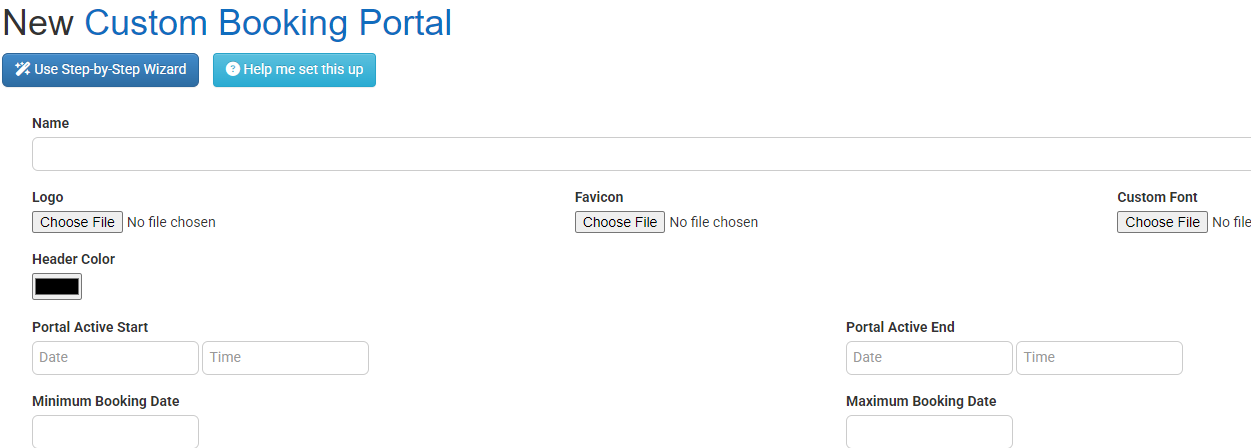
Give the portal an internal name, choose branding options and set when it can be used. View larger →
Control agent permissions
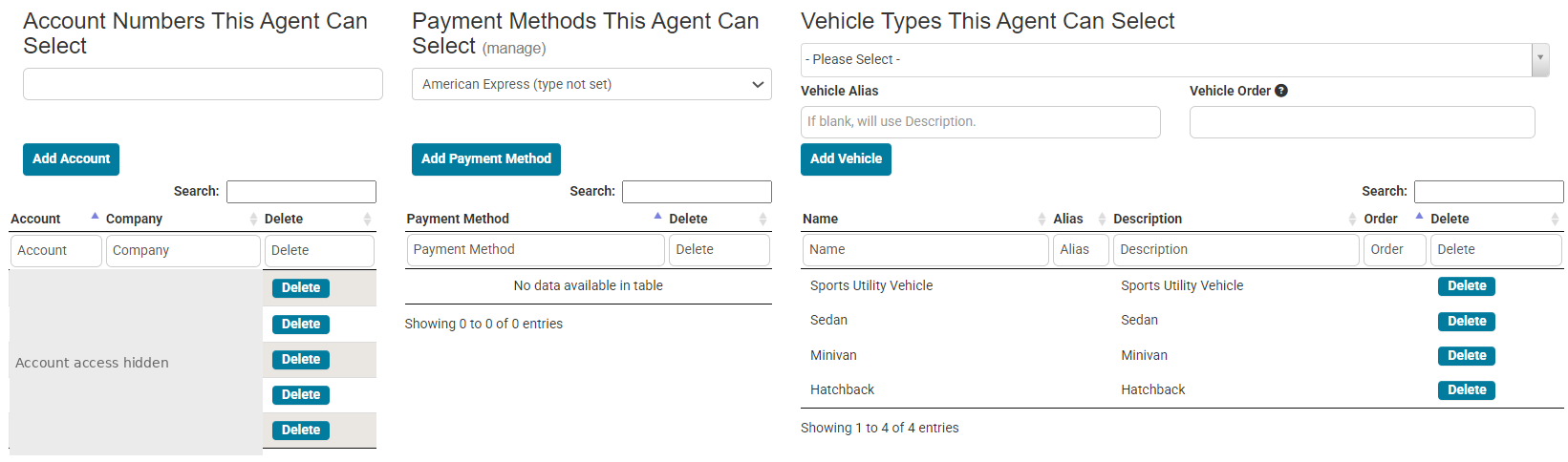
Choose the accounts, payment methods and vehicle types an agent is allowed to select. View larger →
Set up saved stops
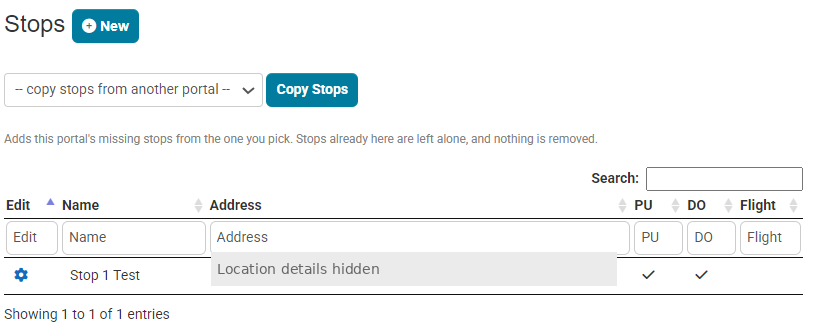
Reuse destinations for hotels, corporate offices, airports and events. View larger →
Manage voucher batches

Issue single-use codes for approved, account-billed transportation. View larger →
Screens contain sample information and some predate the 2026 interface refresh. Current screens can differ by product release and account settings.
More than a booking form
Help clients stay informed after the reservation.
The updated portal adds self-service and trip visibility tools. What each account can see or change depends on the permissions you enable.
Make permitted changes
Authorized customers can modify eligible upcoming reservations or cancel with confirmation. Operators choose the editable fields; significant changes are flagged for staff review.
Follow trip progress
Where tracking is available, portal users can see reservation status and available chauffeur-location information, including whether a location is live or last recorded.
Access trip history
Authorized accounts can review trips and export records for selected dates, while operators can analyze bookings by portal and agent.
Changes are no longer available once the chauffeur is on the way. A vehicle or service change does not automatically reprice the reservation; material changes can require review by your team.
Getting started
Start with one account. Show one working booking.
You don't need to create a different booking application for every prospect. Begin with a controlled demo portal and show how a corporate coordinator or hotel concierge would actually use it.
Corporate travel, concierge reservations, or approved event transfers.
Apply authorized accounts, services, vehicles, saved stops and billing rules.
Walk through a sample reservation, confirm its status, and explain client access.
With recent setup improvements, administrators can start a new client from an existing portal's settings without copying the prior client's users or billing accounts. Always use demonstration data until authorized client access and billing terms are agreed.
Questions operators ask
What you can—and cannot—customize.
Does the portal automatically create a custom marketing website?
No. Limo Anywhere creates the hosted booking interface. It supplies a portal link and iframe code, so you can share the booking experience directly or place it within a separately designed page. The external page and the booking application remain distinct.
Can I redesign the booking form completely using CSS?
Custom CSS is documented for advanced portal styling, alongside logos, images, fonts and labels. It can adjust supported visual elements, but it is not the same as a free-form website builder. Test advanced styling against the current portal layout before promising a particular design.
Can hotel guests book rides billed to a hotel?
Yes, for arrangements the hotel has approved. Single-use vouchers can allow an eligible guest to make one booking billed to the account associated with that code. The hotel and transportation provider should control who receives codes and which trips qualify.
Can corporate clients receive special rates?
Operators can configure appropriate rate sheets and selection factors so eligible portal bookings use the correct contracted rates. Rate selection and billing rules should be tested before launch.
Can clients change or track a reservation?
Yes, when enabled for that portal. Authorized account users can manage permitted upcoming-trip details, follow available dispatch status and vehicle tracking, and export trip history. Significant changes may require staff review.
Which Limo Anywhere plans include Custom Booking Portals?
Custom Booking Portals are a Plus feature and are also included with Limo Anywhere Black.
A more useful conversation with your next account
Show clients how booking with your company could work.
Start with the real Limo Anywhere booking experience, configure it for a specific use case, and demonstrate the reservation flow. A polished service starts with a process customers can actually use.
To learn more, see the Custom Booking Portals guide and the September and October 2026 product updates. Available capabilities depend on portal settings and account permissions.