Creating and Applying Account Credits in Limo Anywhere
Account credits give your operation a flexible way to manage customer funds at the account level. They can be used for prepayments, overpayments, gift cards, loyalty credits, and other balances that need to be applied later to a reservation or invoice.
Instead of tracking those balances in spreadsheets, notes, or outside systems, account credits help keep customer funds connected to the appropriate account inside Limo Anywhere.
In this guide, we’ll walk through how account credits work, how to create them, how to request payment toward account credits using LA Pay, and how to apply available credits to a reservation.
Quick answer
Account credits are funds stored on a customer account that can be used as payment toward a future reservation or invoice. Operators commonly use them for customer prepayments, gift cards, loyalty credits, overpayments, and account adjustments.
In this article
What Are Account Credits in Limo Anywhere?
Account credits are funds stored on a customer account that can be used as payment toward a future reservation or invoice.
Operators commonly use account credits for:
- Customer prepayments
- Gift cards
- Loyalty or frequent rider programs
- Reservation overpayments
- Invoice overpayments
- Future ride balances
- Customer account adjustments
For example, if a client pays in advance for future rides, your team can add those funds as account credits. When that client books a reservation later, the available credit can be applied toward the trip.
This helps keep customer balances organized in Limo Anywhere and reduces the need to track credits manually outside the system.
When Should Operators Use Account Credits?
Account credits are useful any time customer funds need to stay connected to an account and be applied later.
Prepayments
A customer may want to add funds to their account before booking future rides. This can be useful for frequent travelers, corporate clients, or customers who prefer to maintain a prepaid balance.
Gift Cards or Loyalty Credits
If your company offers gift cards, customer promotions, or loyalty rewards, account credits can help track the available value on the customer’s account.
Overpayments
If a customer overpays a reservation or invoice, the remaining amount can be moved to the account as a credit and applied later.
Account Adjustments
In some cases, rather than issuing an immediate refund, an operator may choose to leave a balance on the account for future use. This should always follow your company’s billing, refund, and accounting policies.
Cleaner Account Management
For repeat clients and corporate customers, account credits create a more organized way to track available funds, payment activity, and future-use balances.
Where to Find Account Credits in Limo Anywhere
To view or manage account credits, start from the customer account.
- Click Accounts in the navigation bar.
- Search for and open the appropriate account.
- Go to the Financial Data tab.
- Click the Available Account Credits link on the right-hand side.
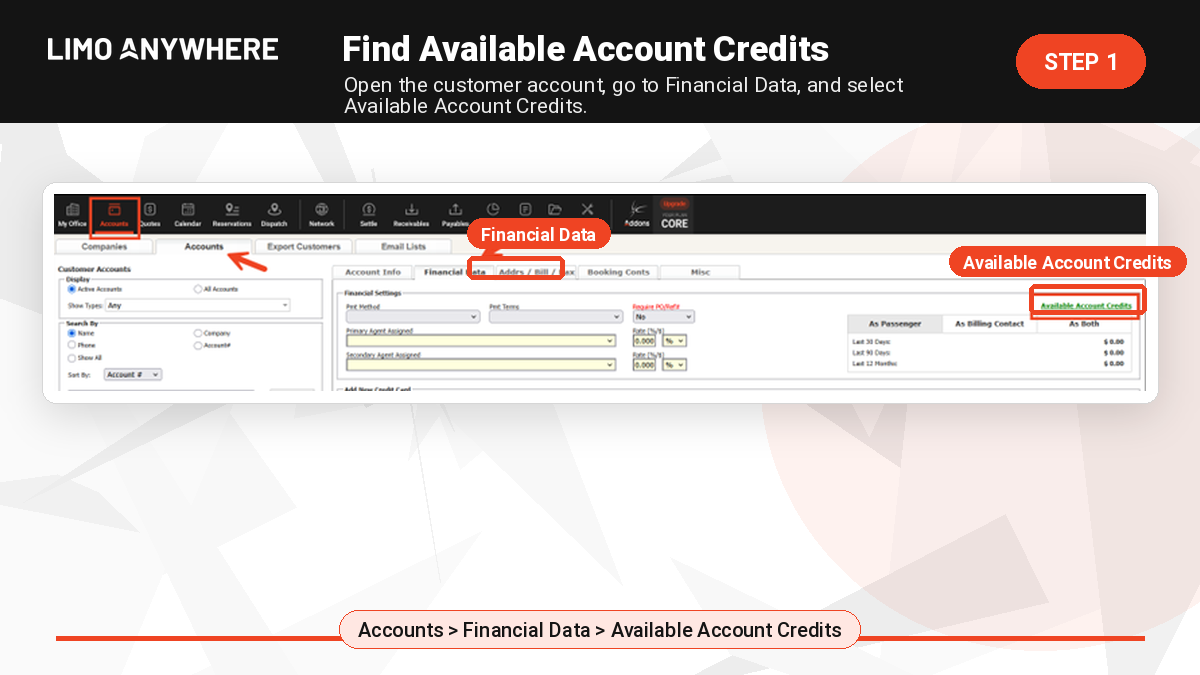
From this screen, you can view existing account credits and add new credits to the account.
How to Create Account Credits in Limo Anywhere
To manually create account credits:
- Click Accounts in the navigation bar.
- Search for and open the appropriate account.
- Navigate to the Financial Data tab.
- Click Available Account Credits.
- Select the appropriate payment method.
- Enter the amount to be applied as a credit.
- Add notes or reference details if needed.
- Click Submit.
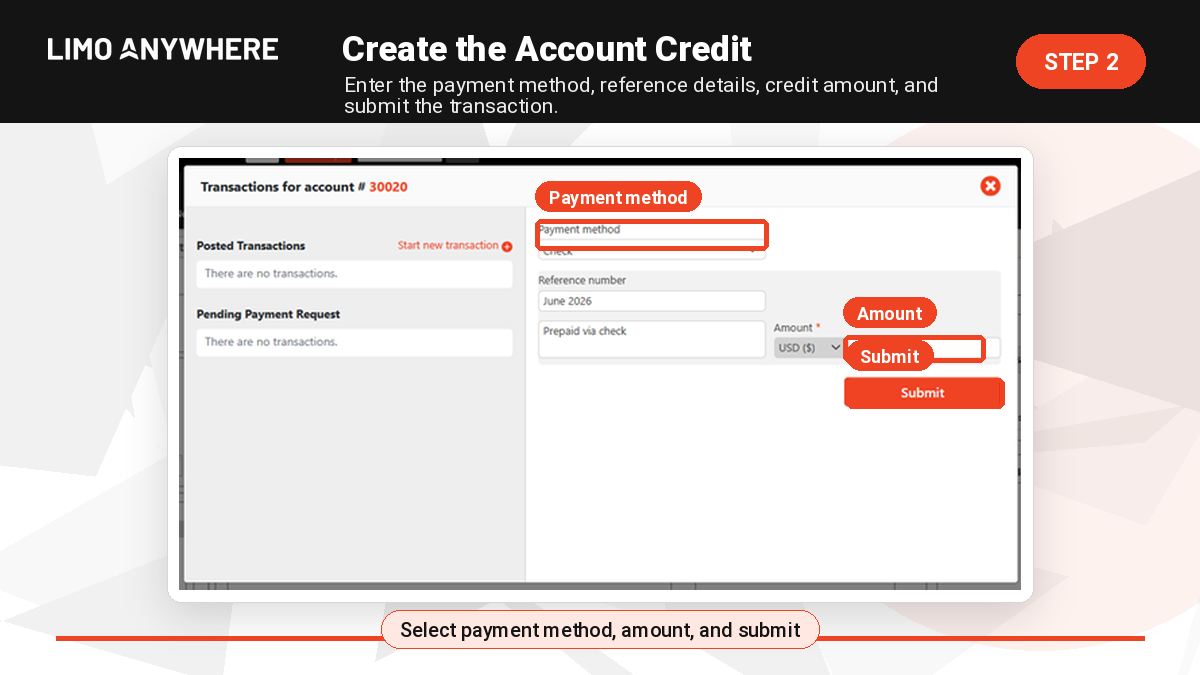
Once submitted, the available credit will appear on the account and can be applied to future transactions.
How to Request Payment for Account Credits with LA Pay
If your company uses LA Pay, you can request payment directly toward account credits.
This is helpful when a customer wants to add funds to their account and you want them to complete the payment securely through a payment request.
To request payment for account credits:
- Click Accounts in the navigation bar.
- Search for and open the appropriate account.
- Navigate to the Financial Data tab.
- Click Available Account Credits.
- Select a payment method mapped to the CCARD subtype.
- Choose Request a Payment from the Pay With dropdown.
- Enter the payer’s name and email address.
- Add payment notes if needed.
- Enter the payment amount.
- Click Send Payment Request.
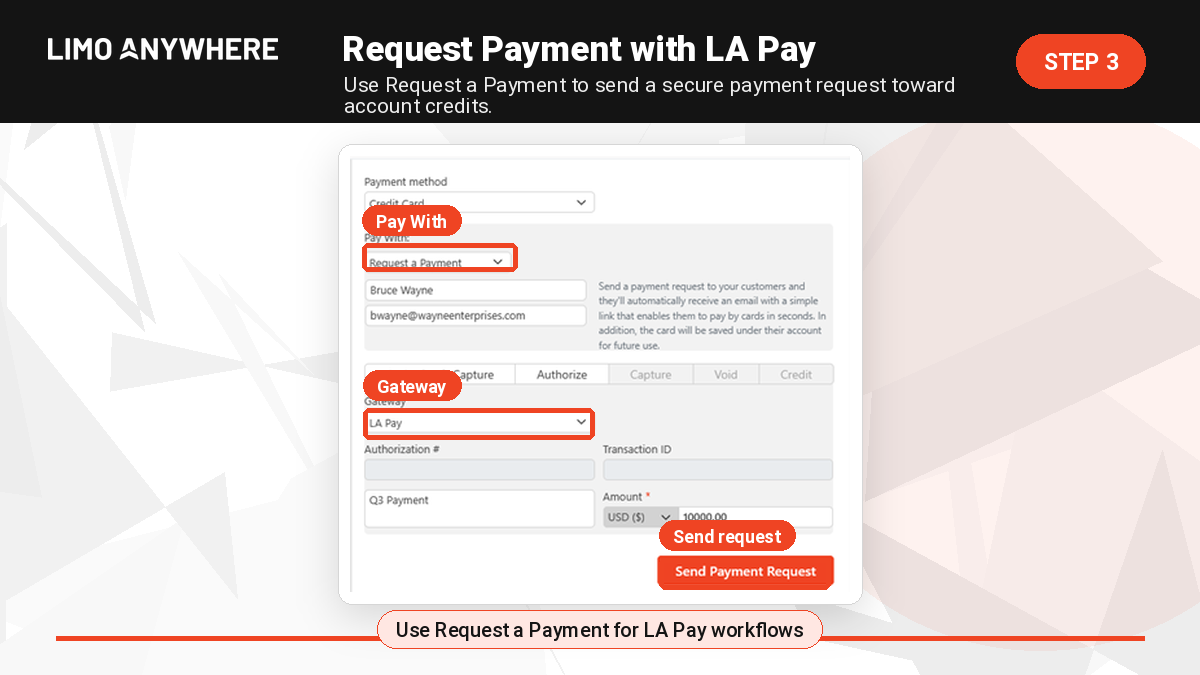
After the customer completes the payment, review the account to confirm the credit has been posted before applying it to a reservation or invoice.
How to Apply Account Credits to a Reservation
Once credits are available, they can be applied to a reservation during the payment process.
To apply account credits to a reservation:
- Open the reservation.
- Click the Payment icon at the top of the screen.
- Select Credits from the Payment Method dropdown.
- Enter the amount to apply from the available account credits.
- Click Submit.
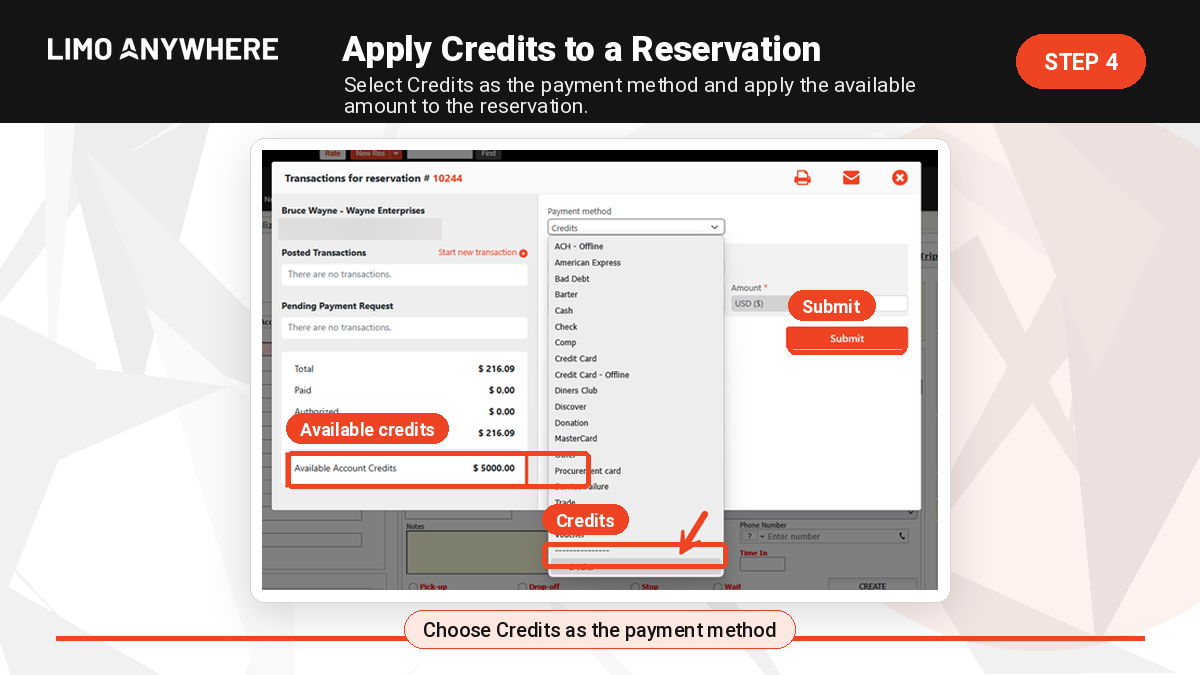
If a balance remains after the credit is applied, you can process an additional payment using another payment method.
Confirming the Credit Was Applied
After applying credits to a reservation, it is a good practice to confirm the payment was recorded correctly.
You can do this by reviewing the reservation payment activity and checking the customer’s available account credit balance under the Financial Data tab.
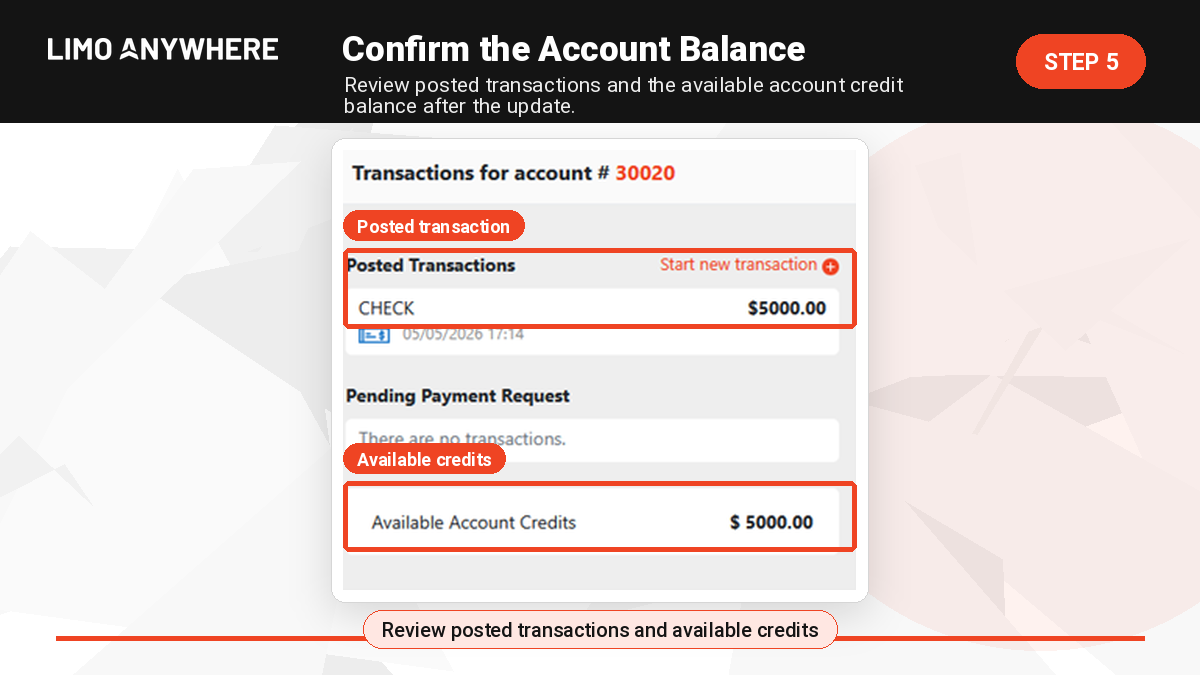
This helps your team confirm that the credit was used properly and that the remaining customer balance is accurate.
Account Credits from Reservation Overpayments
Account credits can also be created when a customer overpays a reservation.
For example, if a reservation has an outstanding balance and the payment entered is greater than the amount due, the overpaid amount can be moved to the account as a credit after the reservation is settled.
A common workflow is:
- Open the reservation.
- Click the Payments icon.
- Select the appropriate payment method.
- Enter an amount greater than the outstanding balance.
- Click Submit.
- Click More.
- Click Settle.
- Review the customer account to confirm the overpaid amount appears as an available account credit.
This helps preserve the remaining funds on the customer account so they can be applied to a future reservation or invoice.
Account Credits from Invoice Overpayments
Account credits may also be created when a customer overpays an invoice.
If an invoice payment is entered for more than the outstanding balance, the invoice can show as paid in full. After the invoice is closed, the overpaid amount can be moved to the customer account as a credit.
Important: Before closing an invoice, make sure the invoice has been finalized.
Once the overpayment is processed, review the customer account under the Financial Data tab and click Available Account Credits to confirm the credit appears.
Reversing or Refunding Account Credits
There may be times when you need to reverse or refund account credits.
For example, you may need to correct a credit that was entered by mistake, refund a customer, or adjust the account balance after a payment change.
To review account credit transactions:
- Open the customer account.
- Go to the Financial Data tab.
- Click Available Account Credits.
- Review the Posted Transactions section.
- Select the transaction that needs to be reversed or refunded.
- Follow the appropriate process based on the original payment type.
Credit card transactions and non-credit-card transactions may follow different reversal or refund steps, so confirm the original payment method before making changes.
For more detailed support instructions, visit the Limo Anywhere Knowledge Center guide on managing account credits.
Best Practices for Managing Account Credits
Account credits are most useful when your team applies them consistently. Here are a few best practices to consider.
Use Clear Notes
When adding credits, include notes that explain why the credit was created.
- Prepayment for future rides
- Gift card purchase
- Loyalty credit
- Overpayment from reservation
- Overpayment from invoice
- Customer account adjustment
Clear notes make it easier for dispatch, billing, and management teams to understand the credit later.
Confirm the Account Before Applying Credits
Before applying credits to a reservation, confirm that you are working in the correct customer account and that the available credit belongs to that customer.
This is especially important for corporate accounts, repeat clients, and accounts with multiple passengers or bookers.
Keep Payment Methods Organized
Because account credits are tied to payment workflows, make sure your payment methods are set up clearly. A clean payment method list can help reduce confusion and payment-entry errors.
For more information, review the Limo Anywhere article on payment methods and custom payment options.
Train Dispatch and Billing Teams
If multiple employees process reservations, payments, or invoices, make sure they understand when to use account credits and how to apply them correctly.
A consistent internal process can help reduce billing mistakes and improve the customer experience.
Review Outstanding Credits Periodically
Periodically review accounts with available credits. This helps your company track customer balances, identify unused credits, and confirm credits are being applied properly.
Why Account Credits Matter for Operators
For limo, livery, black car, and ground transportation companies, customer account management is not just about collecting payment. It is also about keeping financial activity organized across reservations, invoices, repeat clients, and corporate accounts.
Account credits can help operators:
- Track customer balances more clearly
- Manage prepayments and overpayments
- Support gift card or loyalty credit workflows
- Apply funds to future reservations or invoices
- Reduce manual tracking outside the system
- Keep payment activity connected to the customer account
- Create a more organized billing experience for repeat clients
When used consistently, account credits can help your team keep customer balances cleaner and make payment workflows easier to manage.
Frequently Asked Questions About Account Credits in Limo Anywhere
What are account credits in Limo Anywhere?
Account credits are funds stored on a customer account that can be applied to a future reservation or invoice.
What can account credits be used for?
Operators commonly use account credits for prepayments, gift cards, loyalty credits, reservation overpayments, invoice overpayments, and customer account adjustments.
Can account credits be applied to reservations?
Yes. Once credits are available on an account, they can be selected as a payment method and applied to a reservation.
Can account credits be used for invoices?
Yes. Account credits can be used for payment on a reservation or invoice.
Can account credits be created from an overpayment?
Yes. If a customer overpays a reservation or invoice, the overpaid amount can be moved to the customer account as an available credit.
Can customers pay toward account credits through LA Pay?
Yes, if your company uses LA Pay and the appropriate payment method is configured, you can request payment directly toward account credits.
Can account credits be reversed or refunded?
Yes. Account credit transactions can be reviewed and, when appropriate, reversed or refunded based on the original payment type and transaction details.
Learn More About Limo Anywhere Payment Tools
Limo Anywhere helps operators manage reservations, dispatching, customer accounts, billing, and payments.
If you are interested in learning more about payment tools inside Limo Anywhere, visit the LA Pay page to explore how Limo Anywhere supports secure payment workflows.
You can also visit the Limo Anywhere Knowledge Center for additional support resources, including detailed instructions on managing account credits.
Want Cleaner Payment Workflows in Limo Anywhere?
Limo Anywhere helps operators manage reservations, customer accounts, dispatching, billing, and payments from one system.
Need Help?
If you have questions or need assistance, contact the Limo Anywhere Support Team.
Phone: 972-701-8887 x2
Email: Support@LimoAnywhere.com
Recent Posts

Why Customers Still Call Instead of Booking Online
Friday September 18, 2026
Live Webinar: Discover What’s Possible with Limo Anywhere Plus & Black
Thursday September 17, 2026