Built to make everyday workflows smoother
The latest Limo Anywhere release focuses on reducing setup friction, improving visibility into back-office processes, and making customer-facing communication more dependable.
Some of these updates improve tools you may already use every day. Others are a reminder to review what is available in your current package, what may need to be enabled, and which add-ons could help your team work more efficiently.
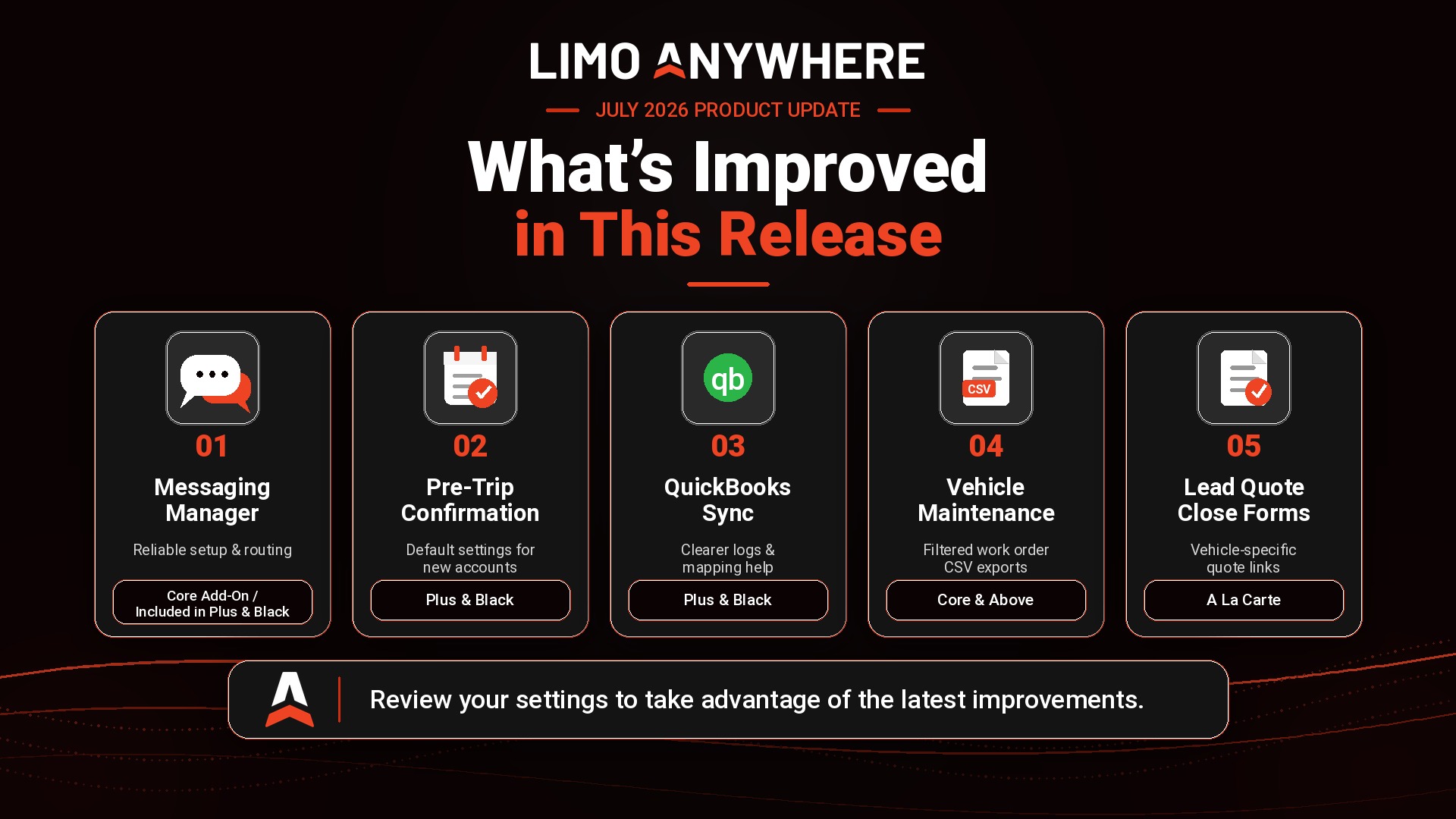
More reliable Messaging Manager setup and SMS masking routing.
New default account setting for Pre-Trip Confirmation.
Clearer QuickBooks sync logs and product mapping validation.
Restored Vehicle Maintenance CSV exports with better filtering.
More flexible Lead Quote Close forms for vehicle-specific quote links.
Small updates can remove big operational friction.
Whether your team is confirming trips, troubleshooting a QuickBooks sync, exporting work orders, or sending a prospect to the right quote form, this release is designed to help the work feel cleaner and more predictable.
Messaging Manager: more reliable setup and routing
Messaging Manager activation now waits until a supported SMS provider has been successfully connected and verified. This helps prevent messaging from being enabled before SMS delivery is ready.
We also improved masked message routing so driver replies are only relayed when they belong to the correct active conversation. The goal is simple: keep driver, passenger, and dispatch communication flowing through the intended channel.
For existing accounts using a legacy Plivo setup, the SMS Manager activation flow has also been refined to reduce extra setup steps and make onboarding more straightforward.
Are you using Messaging Manager?
Plus and Black customers should review whether Messaging Manager is active and properly connected. Core customers can ask about adding Messaging Manager if their team still relies on scattered manual texting.
SMS provider fees and availability may vary by account setup.
Pre-Trip Confirmation: easier defaults for future accounts
Administrators can now enable Pre-Trip Confirmation for newly created accounts by default. This is helpful for operators who want new accounts to automatically follow the same confirmation process without requiring manual updates after each account sync.
We also corrected the Edit Confirm Notification and Edit Decline Notification buttons on the Pre-Trip Confirmation settings page so they open the expected rules correctly.
- Use the new default setting when you want future accounts automatically enabled.
- Continue managing existing accounts independently using the account list.
- Update confirm and decline notification rules without running into the previous rule-opening issue.
Plus or Black customer?
Review your Pre-Trip Confirmation settings and decide whether new accounts should be enabled by default.
Vehicle Maintenance and imports: cleaner visibility for operations
The Export as CSV option has been restored on the Vehicle Maintenance page. Exports now respect active filters, include all matching work orders instead of only the current page, and use the same formatted vehicle name shown in the interface.
We also improved Import History sorting so pending, processing, and completed imports appear in a more accurate chronological order. This makes it easier to understand what is happening when multiple CSV uploads are queued or processing at the same time.
Already using Vehicle Maintenance?
Use filtered CSV exports to review work orders, share maintenance data with your team, or keep cleaner fleet records.
QuickBooks: better sync visibility and easier mapping troubleshooting
QuickBooks sync activity now includes logs for both successful and failed trip push attempts. Failed syncs include more detail about why the push did not complete, helping teams identify configuration issues more quickly.
QuickBooks product mapping validation has also been improved. Instead of showing a generic message, validation now identifies the affected mapping tab and gives clearer guidance about invalid UNMAPPED configurations.
- See whether trip pushes succeeded or failed.
- Review failed sync reasons to help resolve setup or mapping issues.
- Find invalid product mapping configurations faster.
Using QuickBooks with Limo Anywhere?
Check sync logs when trips do not push as expected. If accounting handoffs are still manual, QuickBooks integration may be a good reason to review your package.
Lead Quote Close forms: more flexible vehicle-specific quote links
Lead form embeds now support preselecting a vehicle category using a URL parameter. This allows operators to link from vehicle-specific website buttons, fleet pages, or campaign pages directly into a quote form with the right vehicle category already selected.
For example, a “Get a Quote” button on an SUV page can open the lead form with SUV already selected. The selected vehicle category is also preserved on submission so it is included in the lead data.
This update works alongside existing tracking parameters, including UTM parameters and click identifiers, so operators can connect more specific website and campaign experiences to their lead capture flow.
Using Lead Quote Close?
Consider adding vehicle-specific quote buttons to your fleet pages or marketing campaigns. Not using LQC yet? Ask whether it fits your quote-to-booking workflow.
Driver Status: more consistent custom page styling
Custom CSS configured for the Driver Status page now applies more consistently, including when the page is accessed directly instead of through a link with a CSS parameter.
This helps customer-configured Driver Status page styling behave more reliably across different entry points, including bookmarks, direct links, and other navigation paths.
Using Driver Status pages?
Review your Driver Status page experience and confirm your customer-configured display preferences still look the way you expect.
For Core customers
Vehicle Maintenance exports and import visibility improvements are practical reminders to review the operational tools already available in your Limo Anywhere account.
For Plus and Black customers
Messaging Manager, Pre-Trip Confirmation, QuickBooks, and Driver Status updates can help reduce manual work, improve reliability, and give your team clearer troubleshooting paths.
Are you taking full advantage of the tools in your package?
Review your settings, confirm your active tools, and connect with the Limo Anywhere team if you want help understanding what is included in your current package or what can be added.
Package availability, feature access, and SMS provider requirements may vary by account configuration. Contact the Limo Anywhere team if you are unsure whether a feature is included, enabled, or available as an add-on for your account.