Product update / LA Net
LA Net Update: More Control Over the Notes You Share With Affiliates
Choose which notes to transfer—and keep incoming partner information separate from your team’s operational notes.
When you farm out a trip, your affiliate needs the information required to carry it out. Your team may also have working notes that are not intended to be part of that handoff.
The LA Net notes update gives both sides of an affiliate trip a clearer way to manage that information. The sending operator chooses which note fields to share. The receiving operator gets those shared notes in Partner Notes, separate from its own Trip Notes and Dispatch Notes.
Choose which notes to send
Previously, a single note-sharing option transferred Trip Notes and Dispatch Notes together. With this update, separate controls let your team choose the information to include in an LA Net transfer.
On the LA Net eFarm-Out screen, the Trip Notes transfer option is labeled “Include Notes/Comments when transferring.” Dispatch Notes has its own “Include Dispatch Notes when transferring” checkbox.
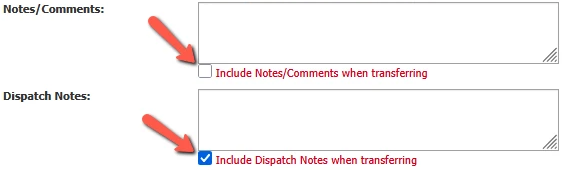
To share Trip Notes without Dispatch Notes, select “Include Notes/Comments when transferring” and leave “Include Dispatch Notes when transferring” unchecked.
Keep incoming affiliate notes separate
The receiving side of the trip has an important change, too. Notes the originating operator chooses to share are placed in the receiving operator’s Partner Notes field.
Partner Notes is read-only for the receiving operator. That team can use its own Trip Notes and Dispatch Notes for its working information, without note updates from the originating operator overwriting those fields.
Read-only does not mean the shared information cannot change. Partner Notes can reflect updates from the originating operator; the receiving operator simply does not edit those shared notes in that field.
How the notes are organized
Sending operator
Choose which note fields to include in the transfer.
notes
Receiving operator
Shared notes from the originator.
Read-only for the receiving team.
Maintained separately by the receiving team. Not overwritten by the originator’s note updates.
An example: sharing Trip Notes only
Imagine your team is farming out an airport transfer. Trip Notes contains pickup instructions the affiliate needs. Dispatch Notes contains a reminder for your own office to review the customer’s return trip.
Selecting only the Trip Notes transfer option sends the pickup instructions without including that internal reminder. The affiliate receives the shared information in Partner Notes and can add its own local coordination details in its Trip Notes or Dispatch Notes.
If your team later updates the shared pickup instructions, the affiliate’s own working notes are not overwritten by that update.
Put the update to work with your team
Use this change as an opportunity to review how your team prepares and receives affiliate trips.
-
Agree on where information belongs.
Establish a consistent approach to affiliate-facing details and internal working notes. -
Review the transfer selections.
Before farming out a trip, check both note fields and select the ones intended for the receiving affiliate. -
Use Partner Notes for incoming information.
On received trips, look there for the originator’s shared notes and maintain your own working information in Trip Notes and Dispatch Notes.
The result is a clearer distinction between the notes you share and the notes each operation maintains for its own work.