Understanding Default and Custom Payment Methods
Payment methods allow you to choose how reservations are billed, tracked, and reported. The system includes a set of standard payment options, along with the ability to create custom methods that reflect how your operation handles different types of transactions.
The system comes configured with several standard options, including major credit cards (Visa, MasterCard, American Express, and Discover), as well as cash, check, direct bill/invoice, donation, and ACH. These standard default methods are built into the system and cannot be edited or removed.
For circumstances that don’t align with the preexisting options, Limo Anywhere allows you to create custom payment methods.
Default Payment Methods
| Payment Method Subtype | Code | Name |
| ACH | ACH | ACH |
| OTHER | ACHO | ACH - Offline |
| CCARD | AX | American Express |
| OTHER | BARTER | Barter |
| OTHER | CASH | Cash |
| OTHER | CHECK | Check |
| CCARD | CC | Credit Card |
| OTHER | CCO | Credit Card - Offline |
| CREDITS | CREDITS | Credits |
| CCARD | DC | Diners Club |
| BILL | BILL | Direct Bill/Invoice |
| CCARD | DS | Discover |
| OTHER | DONATION | Donation |
| CCARD | MC | MasterCard |
| OTHER | OTHER | Other |
| CCARD | BT | Procurement Card |
| REFUND | REFUND | Refund |
| OTHER | TRADE | Trade |
| CCARD | VI | Visa |
| OTHER | VOUCHER | Voucher |
Adding a Custom Payment Method
To create a new payment method:
- Click the “My Office” icon in the navigation bar
- Open the “List Management” tab
- Select “Payment Methods” from the left-hand menu
- Click “Add New Payment Method”
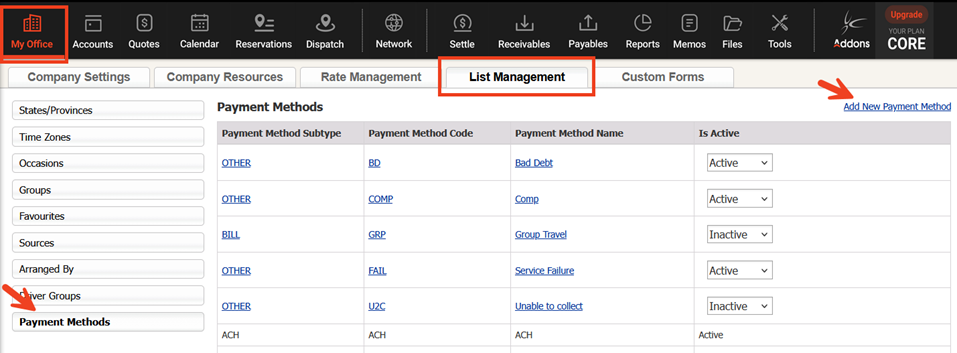
5. Choose a Payment Method Subtype (CCARD for credit cards, BILL for invoices, or OTHER for all other payment types)
6. Enter a unique Payment Method Code
7. Enter a Payment Method Name
8. Set the "Is Active" dropdown to Active
9. Click "Add New" to save
NOTE: While Limo Anywhere allows unlimited custom payment methods, keeping the list concise helps reduce errors and maintain consistent reporting. Periodically review and deactivate any methods that are no longer in use.
Using Custom Payment Methods
Custom payment methods should be used when a reservation doesn’t fit within your standard billing categories. This allows you to track activity more accurately and maintain clean, consistent reporting.
- Complimentary (Comp)
Used for trips that are provided at no charge.- Example:
• VIP or preferred clients receiving courtesy service
• Internal vehicle movement where no client is billed
- Example:
- Promo / Marketing
Used to track reservations tied to promotions or internal initiatives.- Example:
• Giveaways or advertising campaigns
• Employee travel for events, meetings, or trade shows
- Example:
- Bad Debt
Used to track revenue that cannot be collected due to non-payment or disputes. Keeping this separate helps maintain clear reporting and visibility into losses.- Example:
• A client balance that remains unpaid after repeated follow-up
• A disputed charge that results in a chargeback you are unable to recover
- Example:
- Service Adjustments
Used when revenue is reduced due to a service-related issue, such as delays, vehicle problems, or routing errors. This allows you to track the impact without altering the structure of the original reservation.- Example:
• A partial refund issued due to a late pickup or other delay
• A rate reduction due to a vehicle substitution or service issue
- Example:
Have feedback or suggestions about payment methods in Limo Anywhere? We’d love to hear from you. Share your ideas with our Product Team at ProductTeam@LimoAnywhere.com.
If you have any questions or need assistance, call our Support Team at 972-701-8887 x2 or email us at Support@LimoAnywhere.com.
Recent Posts

Why Customers Still Call Instead of Booking Online
Friday September 18, 2026
Live Webinar: Discover What’s Possible with Limo Anywhere Plus & Black
Thursday September 17, 2026