Experience ORES from the booker’s perspective
Operators normally see reservations from inside Limo Anywhere. The person making the reservation sees a completely different experience. Test that experience before asking customers to trust it.
Run the full booking test
- Open the booking page on both a computer and a phone.
- Confirm the booking link is easy to locate from your website.
- Read every Service Type and vehicle option as a first-time customer would.
- Review the displayed price, policies, instructions, and required fields.
- Complete the submission and verify the next step is unmistakable.
Test more than the easy trip
The path can behave differently depending on service, routing, vehicle, and timing. Keep a small set of realistic test reservations and use them whenever you make a meaningful change.
- Airport arrival
- Airport departure
- Point-to-point
- Hourly charter
- Additional stop
- After-hours trip
Find
Can the customer locate the booking link quickly from any important page?
Choose
Are the service and vehicle choices written in language a customer understands?
Submit
Does the price, policy, payment, and form behavior match the trip being requested?
Understand
Does the booker know whether the trip is requested, confirmed, or waiting on action?
Pro tip: Ask someone who does not use Limo Anywhere every day to complete the test. They are more likely to notice labels or instructions your team has learned to work around.
Offer only the Service Types you want booked online
Your online menu does not need to display every service your company can provide. It should help a booker confidently choose the services that can be understood, priced, and submitted without a separate conversation.
Review every Service Type currently visible in ORES. Straightforward airport, point-to-point, or hourly trips may work well online. Complex group movements, unusual itineraries, or services requiring special availability or pricing may be better handled through a call, email, or quote request.
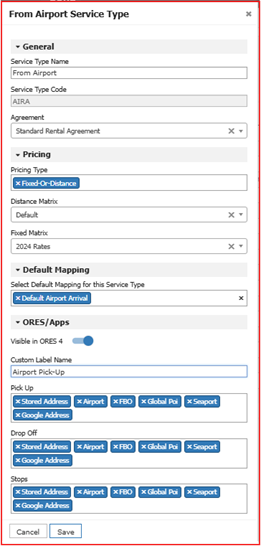
For every visible Service Type, confirm:
- The service is appropriate for online booking.
- The correct Pricing Type and default mapping are assigned.
- The customer-facing label is clear and specific.
- Pickup, drop-off, and stop options fit the service.
- The Rental Agreement is the one you intend to apply.
From Airport
Airport Pickup
Pro tip: A shorter list of clearly labeled choices is usually more useful than displaying every internal option in the system.
Confirm that rates and payments support online booking
ORES uses the rates and pricing rules established in Limo Anywhere. A missing zone, incorrect matrix, outdated fee, or mismatched setting can produce a total your team did not expect.
Build a repeatable pricing test matrix
Do not test only the route you book most often. Test common trips and the edge cases most likely to expose a gap.
Airport service
Test arrivals and departures, including pickup options and applicable fees.
Hourly service
Confirm hourly rates, vehicle minimums, overtime, and customer instructions.
Additional stops
Verify stop pricing and whether route changes affect the displayed total.
Vehicle changes
Compare the same trip across the vehicle types visible to the customer.
Service-area edge
Test trips near zone boundaries or outside your most common coverage area.
Timing rules
Test minimum notice, peak dates, late-night service, and minimum-hour rules.
Verify the displayed total
Check the base rate, fees, taxes, gratuity, minimums, stops, and any other amount the booker sees. The final total should be one your team is prepared to explain and honor.
Test the payment chain
If you display pricing or collect payment online, test how pricing, Auto Accept, the payment gateway, deposits or authorizations, and Auto Payments work together from submission through confirmation.
Pro tip: Keep a short list of standard test trips and rerun it whenever rates, fees, zones, Service Types, vehicle settings, or payment rules change.
Set realistic booking, modification, and cancellation limits
Online convenience should not promise a trip your operation cannot responsibly prepare. Notice periods should give the team enough time to confirm availability, assign the correct vehicle and chauffeur, and review the details.
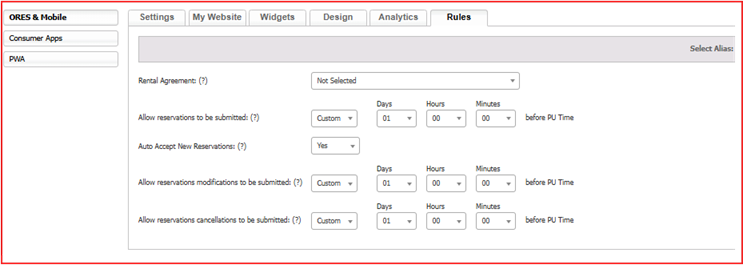
Booking limits
Match the required notice to the service. A routine sedan transfer may need less preparation than a motorcoach, complex event, or large group movement.
Change limits
A last-minute modification can affect routing, capacity, pricing, payment, and chauffeur scheduling. Set the cutoff where the team can still respond reliably.
Revisit these settings before holidays, major local events, seasonal peaks, or any period when normal availability assumptions may no longer apply. If you operate multiple aliases, confirm the intended rules are applied to each one.
Pro tip: Do not wait for a last-minute booking problem to discover that an old rule is still active. Put a calendar reminder in place before each peak season.
Decide exactly what happens after the booker clicks “Book”
The online form is only the front end of the process. Your team needs a defined handoff for monitoring, reviewing, accepting, confirming, and collecting payment on every submitted reservation.
“We received your request.”
The trip is waiting for review or another action. The message should tell the booker what happens next and when to expect a response.
“Your reservation is confirmed.”
The trip has been accepted under the applicable settings. The booker can reasonably expect the service to be provided as stated.
Define the internal handoff
- Who monitors incoming ORES reservations?
- How quickly are pending requests reviewed?
- Which trip details must be verified?
- Who handles unavailable service or pricing exceptions?
- When are deposits, authorizations, or payments processed?
Test the entire chain
- The reservation appears correctly inside Limo Anywhere.
- The right internal notification reaches the right person.
- The customer receives the intended email or message.
- The status shown to the booker is accurate.
- Any required payment action completes as expected.
Pro tip: Auto Accept can create a smoother experience when rates, restrictions, availability, and payment settings are dependable. Manual review adds a checkpoint when trips need closer attention. Whichever method you use, make the status unmistakable.
Make ORES reflect your brand, language, and policies
ORES should feel like a natural continuation of your website and customer-service experience—not a separate system with different terminology, outdated policies, or conflicting expectations.
Brand and customer-facing language
- Use the current company or alias logo.
- Confirm company name, phone, email, and links.
- Match colors and visual treatment to your website.
- Use consistent Service Type labels and vehicle descriptions.
- Remove internal terminology a customer would not recognize.
Agreements and operating policies
- Cancellations and no-shows
- Payments, deposits, and authorizations
- Wait time and overtime
- Additional stops and schedule changes
- Cleaning, smoking, or damage charges
- Privacy, terms, and SMS consent
Review the Rental Agreement assigned to each online Service Type, not just the default agreement. Then complete a test booking and read every screen, disclosure, agreement, checkbox, and confirmation exactly as a customer would.
Review what bookers—and your team—actually do
Treat ORES as an active part of the reservation operation, not a one-time setup project. Repeated questions, corrections, and exceptions tell you where the online experience needs to improve.
Watch for recurring friction
- Service Types customers frequently misunderstand
- Trips that repeatedly require manual repricing
- Missing information that triggers follow-up
- Reservations that regularly need correction
- Policies your team must explain again and again
- Booking paths where customers appear to stop
Create a simple feedback loop
Ask reservation and customer-service staff to keep a running list of ORES-related questions and corrections. Review that list on a regular schedule and assign an owner to test proposed changes before publishing them.
- Monthly issue review
- Quarterly test booking
- After pricing changes
- Before peak season
Measure completed bookings and marketing performance
Formal analytics can help you see which pages and campaigns lead to completed reservations. ORES can send completed reservation activity to Google Analytics 4, while Google Ads tracking may require additional configuration when the booking tool is embedded on your website. Test the setup so completed bookings and booking values appear correctly—and are not counted twice.
Confirm successful bookings appear in the reporting platform you use.
Verify that the reservation amount is populated when pricing is available.
Use attribution data to understand which traffic is producing booked rides.
Pro tip: Start with recurring issues. One unusual booking may not justify a change; the same problem appearing every week almost certainly deserves attention.
The 10-minute ORES audit
Use this list after any major change to pricing, services, vehicles, policies, payments, website content, or operating capacity.
- The booking link is easy to find on desktop and mobile.
- Only appropriate online Service Types are visible.
- Customer-facing labels are clear and current.
- Standard and edge-case trips return expected pricing.
- Booking, change, and cancellation limits match operations.
- Request and confirmation language reflects the true status.
- Branding, contact details, and policies are current.
- The internal owner and response process are defined.
- Notifications, payments, and customer messages are tested.
- Analytics and conversion tracking record a test booking correctly.