Entering and Verifying Flight Information in Limo Anywhere

In Part 1 of this series, we looked at where Limo Anywhere’s flight information comes from. Now, we’ll focus on how to enter and verify a flight, including the information required for tracking and what to check when a flight does not verify.
Information Required for Flight Tracking
Limo Anywhere automatically attempts to verify and track a flight when the required information is entered within the reservation routing.
The reservation should include:
- Pickup date
- Pickup time
- Airport
- Airline
- Flight number
Each field helps the system identify the correct flight. A flight number by itself may not be enough because airlines can use the same flight number on different dates or routes.
Before saving the routing, confirm that the airline, flight number, airport, and travel date match the passenger’s itinerary.
Entering Flight Information in the Airport Routing
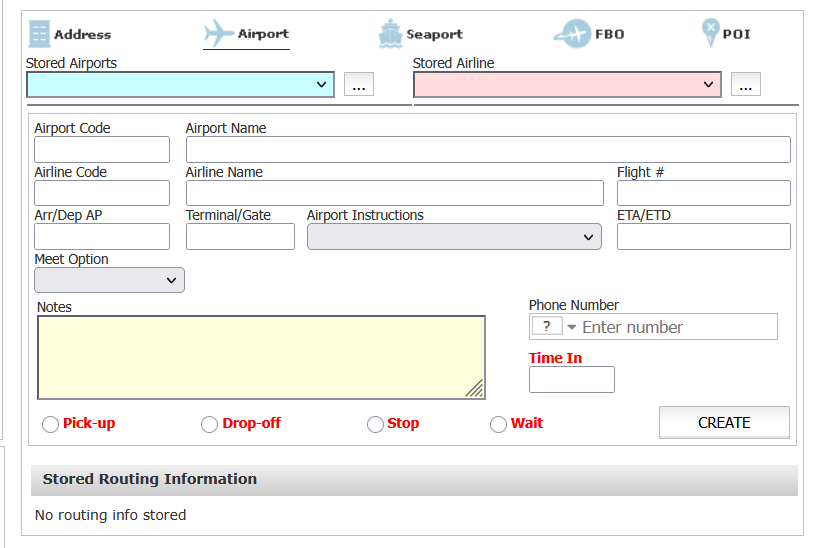
To track a flight, select Airport when adding the applicable routing segment. Enter or select the airport and airline, then enter the flight number in the Flight # field.
Next, indicate how the airport relates to the trip by selecting Pick-up, Drop-off, Stop, or Wait. Arriving flights are typically associated with a pickup, while departing flights are associated with a drop-off. Stops and waits can be used when a reservation includes additional airports or flights.
Flight details should be entered in the designated Airport routing fields rather than only in the Notes field. Although notes can provide helpful instructions for dispatchers and chauffeurs, Limo Anywhere cannot use information entered there to verify or automatically track a flight.
After completing the routing information, select Create and confirm that the flight verifies successfully.
What Flight Verification Means
Flight verification indicates that Limo Anywhere has matched the details entered on the reservation to flight information available through FlightStats.
A verified flight may provide information such as:
- Scheduled flight time
- Estimated or actual flight time
- Current flight status
- Terminal or gate information
Verification is the first step in automatic tracking. If Limo Anywhere cannot match the entered details to an available flight, it cannot reliably provide updates for that routing segment.
A verified flight has been matched to information available through FlightStats. It does not mean that Limo Anywhere independently confirmed the details with the airline. As discussed in Part 1, the underlying flight information is supplied through FlightStats.

Common Reasons a Flight May Not Verify
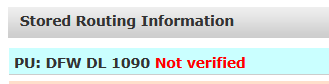
If a flight does not verify, review the information entered on the reservation before attempting to track it manually or contacting Limo Anywhere Support.
Common causes include:
- The incorrect airline was selected.
- The flight number contains a typographical error.
- The wrong travel date was entered.
- The wrong departure or arrival airport was selected.
- The flight was entered on the wrong routing segment.
- The flight is listed under a codeshare partner.
- The flight information is not yet available through FlightStats.
- The airline changed or canceled the flight.
Correcting one of these details may allow Limo Anywhere to locate and verify the flight.
Checking Codeshare Flight Information
A codeshare flight may appear under more than one airline and flight number. The passenger’s itinerary may show the airline that sold the ticket, while another airline is responsible for operating the flight.
If the flight does not verify using the information provided by the passenger:
- Review the passenger’s complete itinerary.
- Look for the airline identified as the operating carrier.
- Locate the operating carrier’s flight number.
- Confirm that the travel date and airports are correct.
- Enter the operating flight information in the appropriate Airport routing.
Depending on how the flight is listed in FlightStats, the operating carrier’s flight number may verify even when the marketing carrier’s number does not.
If neither flight number verifies, include both the marketing and operating flight information when contacting Limo Anywhere Support.
Verifying Multiple Flights in One Reservation
When a reservation includes multiple airports or flights, each flight should be entered in the Airport routing segment it applies to. Flights can be associated with a pickup, drop-off, stop, or wait, allowing each portion of the trip to be tracked separately.
For example, the arriving flight may be associated with the pickup, while another flight can be added to a stop or wait for an additional passenger. A departing flight may be associated with the airport drop-off.
When reviewing a reservation with multiple flights, confirm that:
- Each flight is entered in the correct Airport routing segment.
- The selected airline and flight number match that portion of the itinerary.
- Each flight shows the correct verification status.
- Flight information has not been duplicated in an unrelated routing segment.
Limo Anywhere updated New Dispatch in January 2026 to more accurately display the verification status of flights when a reservation contains multiple airport routing segments. This makes it easier for dispatchers to identify which flights have been verified within more complex itineraries.
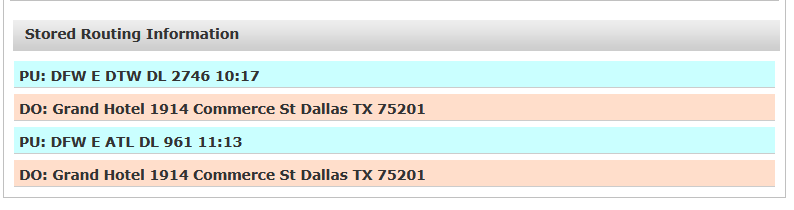
The arrival flight associated with the pickup is especially important when automatic pickup-time adjustments are enabled because it is the flight used to calculate changes to the reservation’s pickup time. We’ll cover pickup-time adjustments and flight offsets in Part 3.
Contacting Limo Anywhere Support
If the reservation details appear accurate but the flight still does not verify, contact Limo Anywhere Support for further review.
Include:
- Reservation number
- Airline and flight number
- Travel date
- Departure and arrival airports
- Marketing and operating flight numbers, if applicable
- Screenshots of the itinerary and reservation routing
- Approximate time the verification issue was observed
Because flight information can change quickly, these details help establish what was displayed at the time of the issue. They also help Support determine whether the problem involves the reservation setup, the information received from FlightStats, or how that information is being processed within Limo Anywhere.
In Part 3 of this series, we’ll review how to configure automatic pickup-time adjustments, select a flight offset, and display or review flight information in both the original Dispatch Grid and New Dispatch.
Recent Posts

Managing Multiple Flights and Troubleshooting Flight-Tracking Issues in Limo Anywhere
Thursday September 24, 2026
Why Customers Still Call Instead of Booking Online
Friday September 18, 2026