Leveraging Sources In Limo Anywhere

Understanding where your bookings come from is an important part of managing day-to-day operations. In Limo Anywhere, Sources allow you to tag reservations based on how the trip originated. This might be a website inquiry, a marketing campaign, a referral partner, or an internal sales effort.
When Sources are used consistently, they provide useful context for reporting, partner management, and day-to-day review without adding complexity to the booking process.
Accessing and Managing Sources
- Click the “My Office” icon.
- Navigate to the “List Management” tab.
- Select “Sources” from the left-hand menu.
- Click “Add New Source.”
- Enter a Source Name and optional Description.
- Confirm the status is set to Active.
- Click “Add New” to save.
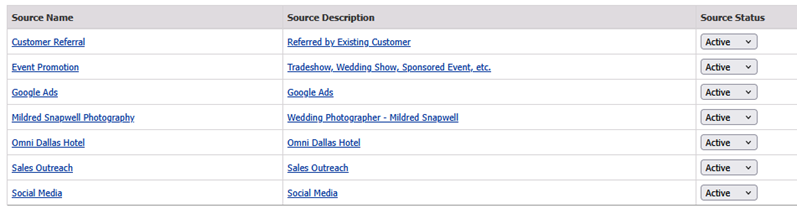
Source names should be clear and recognizable so they are easy to select during booking and easy to interpret later when reviewing reports.
Editing or Deactivating Sources
As your operation evolves, your Source list may need occasional cleanup.
- Click the “My Office” icon.
- Navigate to the “List Management” tab.
- Select “Sources” from the left-hand menu.
- Click on the hyperlink for the Source you want to update.
- Make any necessary changes and click Update.
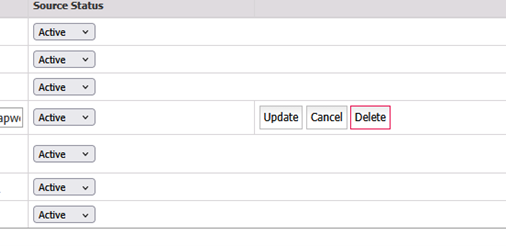
If a Source is no longer in use, you can deactivate it. Limo Anywhere includes default Sources labeled “0” and “000.” If these do not fit your workflow, they can be edited, deleted, or inactivated.
Adding Sources to Reservations
- Open a reservation.
- Locate the “Referral Source” drop-down menu.
- Select the desired Source.
- Click “SAVE RESERVATION” to apply the update.
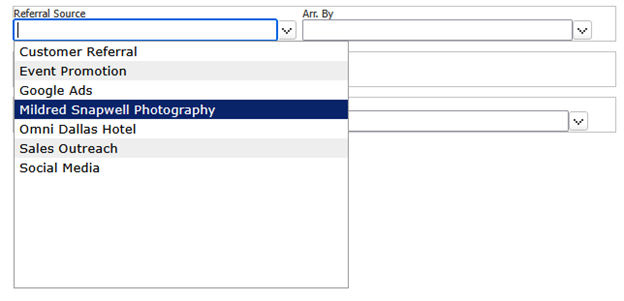
Sources can be assigned during the initial booking process or updated later if the information becomes available after the reservation is created. Consistency matters more than timing. The goal is to ensure each reservation is accurately tagged before reports are reviewed.
Practical Use Cases for Sources
Sources are often associated with marketing, but they serve several operational purposes.
- Tracking Booking Channels
Sources allow you to see which channels are producing confirmed reservations, not just quotes. This can help distinguish between high-volume sources and high-value ones.
- Managing Referral Relationships
For hotels, concierges, travel agents, and other partners, Sources provide a straightforward way to review how often each partner is sending business and what that business looks like over time.
- Internal Tracking and Accountability
Sources can also reflect internal activity, such as outbound sales efforts, account management, or repeat corporate clients, giving additional context when reviewing performance.
Reviewing Source Data in Reports
Sources become most useful when paired with reporting. In the Sales Revenue Report, you can filter by Source to review totals for trips, revenue, hours, and cancellations.
Using Source filters alongside service types or date ranges can help answer questions such as:
- Which referral partners are generating the most revenue?
- Did a recent campaign result in new bookings?
- Are certain Sources associated with higher-value or repeat trips?
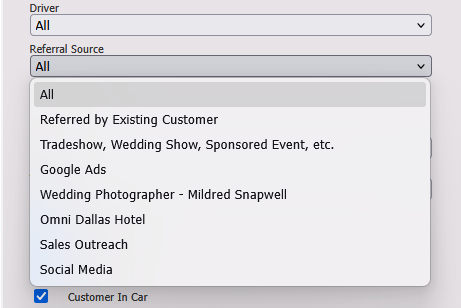
Review your Source list from time to time to remove entries you no longer use and add new ones as your operation changes. Applying Sources across reservations helps keep reporting accurate. When reviewing performance, it’s most useful to look at Sources alongside service types and revenue rather than on their own.
Sources are simple to set up, but they become more useful as your data grows. Over time, they provide better visibility into how bookings enter your system and support more informed decisions across marketing, partnerships, and operations.
If you have questions about setting up or managing Sources or would like help reviewing how they’re being used in your system, the Limo Anywhere Support team can assist. Support is available from 7 AM to 7 PM CT and can be reached by phone at 972-701-8887 Ext. 2, or by email at Support@LimoAnywhere.com for troubleshooting and other general questions.
Recent Posts

Why Black Car Operators Think Marketing Doesn’t Work (and What Actually Changes When It Does)
Friday February 13, 2026
Digital Advertising That Drives Bookings: A Smarter Strategy for Chauffeur & Limo Operators
Monday February 9, 2026