Best Practices Series: Training New Team Members Effectively in Limo Anywhere
Bringing a new team member up to speed—whether it’s a CSR, dispatcher, or back-office staffer—can feel overwhelming. But with a structured approach and smart use of your Limo Anywhere tools, onboarding doesn’t have to be chaotic or inconsistent.
Here’s how to set your new hires up for success with practical, system-focused training that helps them feel confident and competent from day one.
1. Start with Role-Based Priorities
Not every employee needs to know everything about Limo Anywhere—at least not right away. Tailor your training to the specific role:
- CSRs should focus on reservation entry, quoting, client accounts, and basic trip editing
- Dispatchers should master the Dispatch Grid, driver assignments, and trip monitoring
- Accounting staff should learn settlements, receivables, and invoicing
- Chauffeurs (if using DriverAnywhere) need basic mobile status flow and notes comprehension
Start with the essentials for their role, then layer on advanced features as they gain confidence.
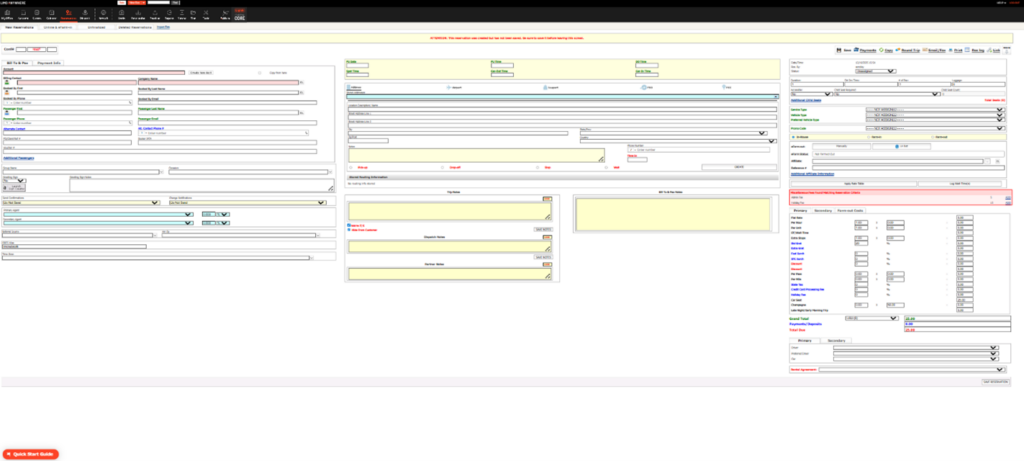
New Reservation Entry Screen in Limo Anywhere:
This is one of the most important screens new CSRs or dispatchers will use. Training should focus on correctly entering key fields like Passenger Info, Service Type, Occasion, Trip Notes, and Pickup/Drop-off Details. Use a sandbox environment or a test client to allow for hands-on practice without affecting live reservations.
2. Create a Safe Practice Environment
Use test clients, vehicles, and “dummy” reservations to allow new hires to:
- Enter and edit reservations
- Practice updating statuses
- Test out settlements and invoices (without affecting live data)
This reduces fear of making mistakes and gives your team real-world familiarity before they go live.
3. Use Checklists to Standardize Training
Build internal training checklists for each role that outline:
- Which modules to review (Reservations, Dispatch, Settle, Receivables, etc.)
- What settings or preferences are critical
- What workflows are expected (e.g., “how we quote airport transfers” or “how we settle retail vs invoice trips”)
Bonus tip: include links to specific Limo Anywhere Knowledge Base articles or videos, and check them off as the new hire progresses.
4. Document Your Internal SOPs
Limo Anywhere is highly customizable—so your workflow may differ from another operator’s. That’s why it’s important to document your internal best practices:
- What notes go in the “Trip Notes” field?
- Which Service Types do we use for special packages?
- Who is responsible for marking a trip as Settled?
Keep a Google Doc or PDF with screenshots and step-by-step instructions unique to your business. Update it as you evolve.
5. Shadowing & Real-Time Coaching
Once the basics are in place, pair new hires with experienced team members:
- Let them shadow live reservation calls, dispatch shifts, or billing reviews
- Review a completed trip history together to see how data flows from booking to billing
- Encourage questions and provide real-time feedback on common errors
People learn best by doing—but even better by doing with support.
6. Reinforce with Ongoing Training
Don’t treat training as a one-time event. Set aside time for:
- Recap or follow-up sessions a few weeks after onboarding
- System update reviews (when Limo Anywhere releases new features)
- Refresher training for seasoned staff who may be out of sync with updated procedures
This ensures knowledge stays fresh and helps catch inconsistencies before they create issues for clients.
Final Thought:
Effective onboarding isn’t about overwhelming your new team member—it’s about building confidence through clarity. With a structured approach, hands-on practice, and clearly documented processes, your staff can thrive in Limo Anywhere and contribute to a smoother operation.
Recent Posts

Digital Advertising That Drives Bookings: A Smarter Strategy for Chauffeur & Limo Operators
Monday February 9, 2026
Be Ready for Anything: Emergency Preparedness with Limo Anywhere
Friday January 30, 2026