Using Auto-Quote Blocking in Lead Quote Close: Managing Operational Restrictions
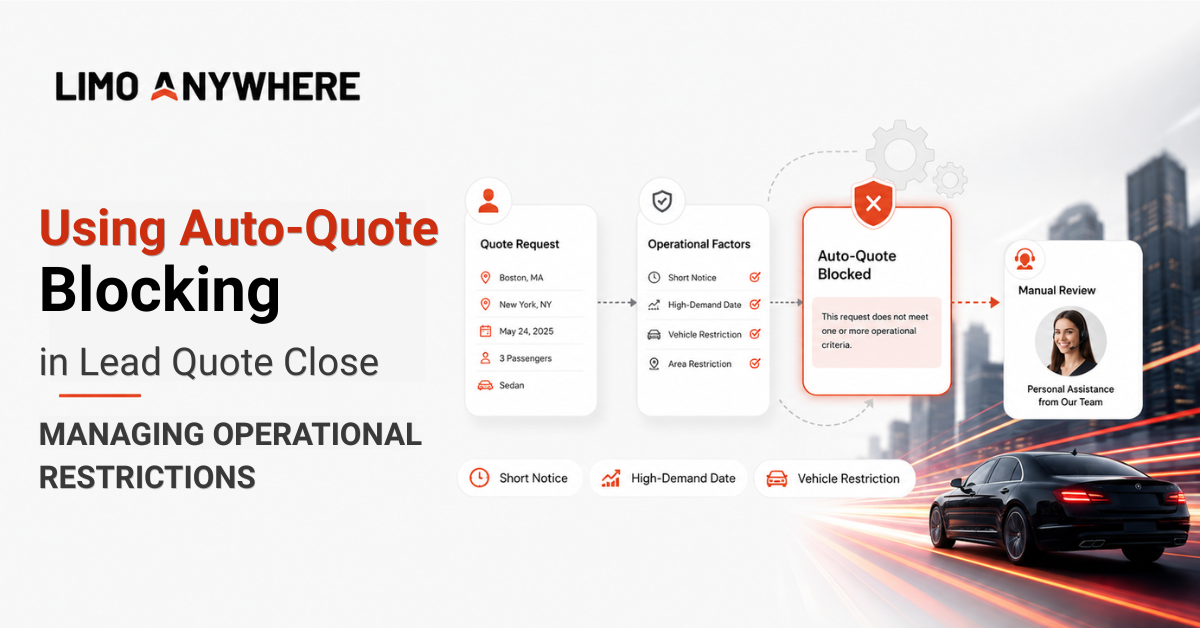
Lead Quote Close allows you to provide customers with quotes quickly, but some requests require additional review before an accurate option can be presented.
Auto-Quote Blocking prevents automatic quotes when specific conditions are met. While these policies are commonly used for sold-out dates and vehicle availability, they can also help manage short-notice trips, venue restrictions, high-demand dates, and other requests that may benefit from personal assistance.
Because each policy can include multiple Selection Factors, you can determine which requests should be blocked and how the customer should be guided toward the next step.
Setting Up Auto-Quote Blocking
- Click the “Addons” icon in the top navigation bar
- Open the “Lead Quote Close (LQC)” module
- Select the "Auto-Quote Blocking" tab

4. Choose the appropriate Selection Factor from the dropdown and enter the corresponding value.

5. Click “Add New” to create the initial policy.
6. Click the gear icon next to your newly created blackout policy to edit additional details, including the “Policy Name,” the client-facing “Auto-Quote Blocked Reason,” and any additional Selection Factors.
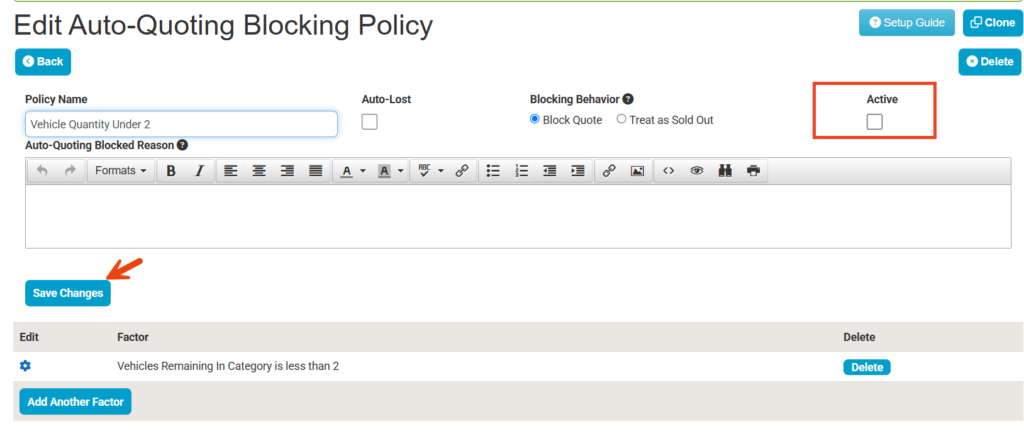
7. Check the "Active" box and click "Save Changes" to enable the policy in your system.
Understanding Blocking Behavior
When creating an Auto-Quote Blocking policy, you can choose how Lead Quote Close handles a request that meets the policy’s conditions.
Block Quote stops the automatic quoting process and presents the customer with the blocked-reason message configured for that policy. This message will usually explain that the request cannot be completed online and direct the customer to contact your office for assistance.
Unless the policy is also marked as Auto-Lost, the lead remains available for your team to review and follow up manually.
Block Quote may be appropriate when:
- Availability needs to be confirmed before a quote is provided
- The selected vehicle cannot accommodate the requested location
- The trip requires operational review
- Your team needs additional information from the customer
- The request cannot proceed through the normal online quoting process
Treat as Sold Out displays the affected vehicle as unavailable rather than stopping the entire quoting process. The customer can be presented with other available vehicle options.
This may be useful when the requested vehicle is unavailable, but the trip itself can still be accommodated.
A policy can also mark the lead as Auto-Lost. When this setting is used, the lead will not remain available for your team to pursue through the normal manual follow-up process.
Blocking Short-Notice Requests
Some trips require more preparation time than others. A same-day airport transfer may be relatively easy to accommodate, while an overnight trip or early-morning pickup may require additional time to confirm a vehicle and chauffeur.
Lead time and pickup time Selection Factors can be combined to identify:
- Trips requested fewer than a certain number of hours before pickup
- Overnight trips submitted on short notice
- Early-morning pickups requested after the office has closed
- Same-day requests involving larger or specialty vehicles
Policies can also distinguish between online and phone requests. An unattended online request can be prevented from receiving an immediate quote while your team remains able to accept the same trip by phone after confirming coverage.
This helps avoid presenting an option that may no longer be available while still giving the customer an opportunity to receive assistance.
Managing High-Demand Dates
Auto-Quote Blocking can help manage holidays, sporting events, concerts, conventions, prom weekends, and other dates when normal availability or pricing rules may not apply.
A policy can apply to an entire date or only a portion of it. The date can also be combined with pickup time, vehicle category, service type, or remaining capacity.
For example, you may allow morning airport transfers while requiring manual assistance for evening service on a major event date. You may also stop automatically quoting a category once only one vehicle remains, giving your team an opportunity to confirm availability or recommend another option.
Preventing Vehicle and Location Conflicts
Some locations can accommodate certain vehicles but not others.
A venue may have a narrow entrance, limited staging space, low clearance, or a turn radius that cannot safely accommodate a larger vehicle. Combining a location-based Selection Factor with a Vehicle Category can prevent an incompatible vehicle from being quoted without blocking every request involving the location.
The customer-facing reason can explain that additional assistance is needed:
The vehicle selected may not be suitable for this location, but another option may be available. Please contact our team so we can help you find the best vehicle for your trip.
Because the customer may still be accommodated, this type of request should generally remain available for follow-up.
In Part 2 of this blog, we’ll review additional uses for Auto-Quote Blocking, including complex itineraries, service-area limitations, high-risk requests, and Auto-Lost leads.
Ready to add Lead Quote Close or explore the features available with another subscription tier? Contact our Sales team at 972-701-8887 x1 or sales@limoanywhere.com to discuss the options available for your operation.
Recent Posts
Why Customers Still Call Instead of Booking Online
Friday September 18, 2026
See Limo Anywhere Plus & Black in Action: Webinar Replay
Thursday September 17, 2026