Configuring and Using ReadBack Scripts in Limo Anywhere
ReadBack Scripts help confirm reservation details accurately by prompting your team to review key information with clients before finalizing a booking. When configured correctly, they standardize communication, reduce data entry errors, and support consistent reservation practices across your operation.
Accessing ReadBack Script Settings
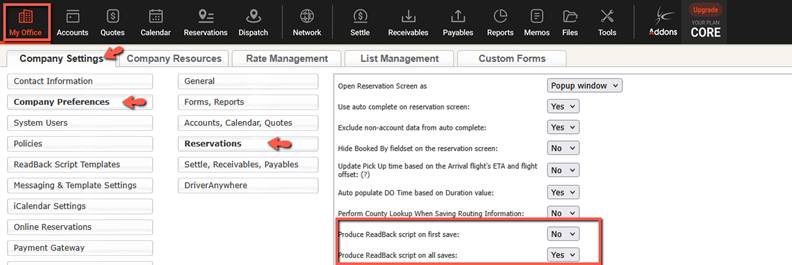
- Click the “My Office” icon.
- Navigate to “Company Settings”, select “Company Preferences” from the left-hand menu, then click “Reservations”.
- You can choose between two system behaviors:
- “Produce ReadBack Script on First Save” generates a script only when the reservation is first saved.
- “Produce ReadBack Script on All Saves” generates a script every time the reservation is saved.
Select the option that works best for your operation and click “Update My Company Preferences” to save changes.
Creating ReadBack Script Templates
ReadBack Script templates allow you to create standardized language for different reservation types. Templates can include text and dynamic Trip Tags that populate reservation details such as pickup date, time, passenger name, and routing information.
To create or edit a ReadBack Script template:
- Click the “My Office” icon.
- Navigate to the “Company Settings” tab.
- Select “ReadBack Script Templates” from the left-hand menu.
- Enter a descriptive template name that reflects the reservation type.
- Assign the template to one or more service types.
- Enter the script text and insert Trip Tags where needed.
- Click “Save.”
Trip Tags reduce manual entry and help ensure that details are read back consistently.
Example ReadBack Script Templates
Below are a few example templates tailored to common service types. They incorporate Trip Tags for automated data and highlight elements the agent should verbally confirm.
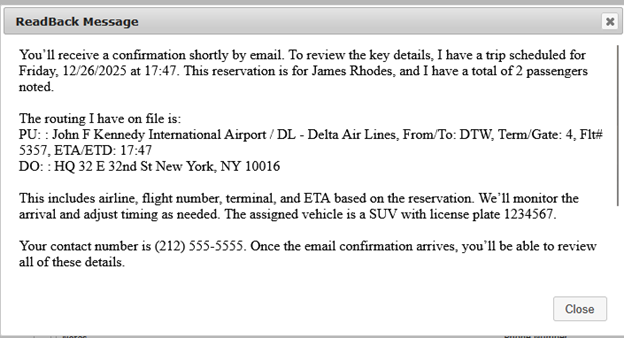
Airport Arrival Template
“You’ll receive a confirmation shortly by email. To review the key details, I have a trip scheduled for #TRIP_PUDAYNAME#, #TRIP_PUDATE# at #TRIP_PUTIME#. This reservation is for #TRIP_PASS_FNAME# #TRIP_PASS_LNAME#, and I have a total of #TRIP_PASSCOUNT# passengers note
The routing I have on file is:
#TRIP_RT_ALL#
This includes airline, flight number, terminal, and ETA based on the reservation. We’ll monitor the arrival and adjust timing as needed. The assigned vehicle is a #TRIP_VEHTYPE_DESC# with license plate #TRIP_CAR1_PLATE#.
Your contact number is #TRIP_PASS_PHONEMOB1#. Once the email confirmation arrives, you’ll be able to review all of these details.”
Agent should verbally confirm:
• airline and flight number
• terminal or gate
• meeting point or baggage claim instructions
Airport Departure Template
“You’ll receive a confirmation shortly by email. To go over what I have, this trip is scheduled for #TRIP_PUDAYNAME#, #TRIP_PUDATE# at #TRIP_PUTIME#. We’ll be transporting #TRIP_PASS_FNAME# #TRIP_PASS_LNAME# with #TRIP_PASSCOUNT# passengers.
The routing on file is:
#TRIP_RT_ALL#
This includes the airline, flight number, and terminal information. We’ll coordinate pickup timing based on your requested airport arrival window. The assigned vehicle is a #TRIP_VEHTYPE_DESC# with license plate #TRIP_CAR1_PLATE#.
We have #TRIP_PASS_PHONEMOB1# listed as your contact number. Your confirmation will allow you to review all trip details.”
Agent should verbally confirm:
• airline and flight number
• terminal
• requested arrival time
General Trip Template
“You’ll receive a confirmation shortly by email. To review, I have a trip scheduled for #TRIP_PUDAYNAME#, #TRIP_PUDATE# at #TRIP_PUTIME# for #TRIP_PASS_FNAME# #TRIP_PASS_LNAME#. The reservation lists #TRIP_PASSCOUNT# passengers.
The routing is:
#TRIP_RT_ALL#
Your assigned vehicle is a #TRIP_VEHTYPE_DESC# with license plate #TRIP_CAR1_PLATE#. We have #TRIP_PASS_PHONEMOB1# as your contact number.”
Agent should verbally confirm:
• passenger count
• special instructions or stops not shown in routing
Wedding or Special Event Template
“You’ll receive a confirmation shortly by email. To confirm what I have on record, your reservation is for #TRIP_PUDAYNAME#, #TRIP_PUDATE# beginning at #TRIP_PUTIME#. This trip is for #TRIP_PASS_FNAME# #TRIP_PASS_LNAME#, with #TRIP_PASSCOUNT# passengers.
The routing I have entered is:
#TRIP_RT_ALL#
Your vehicle is a #TRIP_VEHTYPE_DESC# with license plate #TRIP_CAR1_PLATE#. We have #TRIP_PASS_PHONEMOB1# listed as the primary contact.”
Agent should verbally confirm:
• staging or spot time
• event timing considerations
• additional stops
Corporate Template
“You’ll receive a confirmation shortly by email. To go over the trip details, this reservation is scheduled for #TRIP_PUDAYNAME#, #TRIP_PUDATE# at #TRIP_PUTIME# for #TRIP_PASS_FNAME# #TRIP_PASS_LNAME#, and I have #TRIP_PASSCOUNT# passengers.
The routing entered for this reservation is:
#TRIP_RT_ALL#
This trip is billed to #TRIP_BC_COMPANY#. The assigned vehicle is a #TRIP_VEHTYPE_DESC# with license plate #TRIP_CAR1_PLATE#. The contact number I have is #TRIP_PASS_PHONEMOB1#.”
Agent should verbally confirm:
• billing contact or department
• corporate travel policies or notes
• meeting expectations (lobby, curb, signage)
ReadBack Scripts strengthen the booking process by improving clarity and reducing avoidable adjustments later in the reservation lifecycle. They are especially helpful when training new agents or managing high call volumes, since they provide a repeatable process for verifying key details. Reviewing templates periodically, assigning them only where they add value, and using Trip Tags to automate information helps keep your workflow efficient and dependable.
Recent Posts

SEO & AI Search Marketing Webinar
Monday September 14, 2026
2026 CD/NLA Show
Wednesday September 2, 2026