Managing Multiple Flights and Troubleshooting Flight-Tracking Issues in Limo Anywhere
In the last blog, we reviewed how to configure automatic pickup-time adjustments, select flight offsets, and display flight information in both the original Dispatch Grid and New Dispatch. These settings support many routine airport transfers, but operators may also encounter reservations with multiple flights, codeshare itineraries, cancellations, diversions, or information that differs between sources.
In the final part of this series, we will look at how to structure reservations with multiple flights, when flight details should be reviewed manually, and what information to provide when reporting a discrepancy to Limo Anywhere Support.
Tracking Multiple Flights on One Reservation
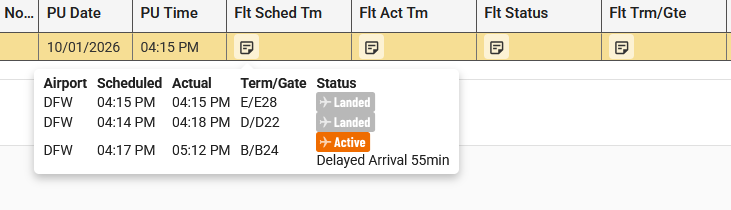
Limo Anywhere can track multiple flights when a reservation contains more than one airport routing segment.
Each reservation can contain one pickup and one drop-off. Additional airport pickup segments can be entered as stops or waits, allowing multiple flights to be associated with the same reservation.
For a reservation with multiple arriving flights:
- Enter the first airport arrival that will control the vehicle’s initial schedule as the pickup.
- Enter additional airport arrivals as stops or waits.
- Add the appropriate airline and flight number to each routing segment.
- Confirm that each flight verifies successfully.
- Review the Flight Stats information for each routing segment in New Dispatch.
For a reservation with multiple departing flights:
- Enter the earlier airport drop-offs as stops or waits.
- Enter the final airport as the reservation drop-off.
- Associate the appropriate flight with each routing segment.
- Confirm that the flights verify successfully.
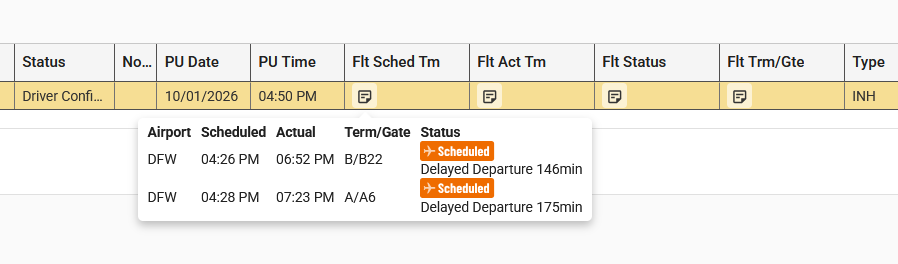
This routing structure allows dispatchers to monitor several flights without creating separate reservations solely for tracking purposes.
Determining Which Flight Controls the Pickup Time
Although multiple flights can be tracked, only the arrival flight associated with the pickup routing can automatically adjust the reservation’s pickup time.
Operators should determine which arrival controls the vehicle’s initial schedule. That flight should be associated with the pickup. Additional flights can then be entered as stops or waits so their information remains available to Dispatch.
Working with Codeshare Flights
A codeshare itinerary may list more than one airline and flight number for the same flight. The airline that sold the ticket may be different from the airline operating the aircraft.
If a flight does not verify or appears under unexpected information:
- Review the passenger’s complete itinerary.
- Identify the airline listed as the operating carrier.
- Locate the operating carrier’s flight number.
- Confirm the travel date and airport.
- Compare the information with the flight entered in the reservation.
Depending on how the flight is supplied through FlightStats, the operating flight number may verify when the marketing airline’s number does not.
When contacting Support about a codeshare flight, include both flight numbers and identify which airline is operating the flight.
When to Review Flight Information Manually
Automatic flight tracking reduces repetitive searches, but manual review may still be needed when:
- A flight does not verify.
- The passenger provides information that conflicts with the tracked flight.
- The airline and Limo Anywhere display different arrival times.
- A flight is cancelled or diverted.
- A codeshare itinerary makes the operating flight unclear.
- A significant delay has not appeared consistently across sources.
- The terminal or gate information appears incomplete.
- Multiple flights on one reservation create conflicting timing.
When manually reviewing a flight, operators may compare the information in Limo Anywhere with the operating airline’s website, the applicable airport, or another available flight-tracking service.
Reviewing Multiple Flight Matches
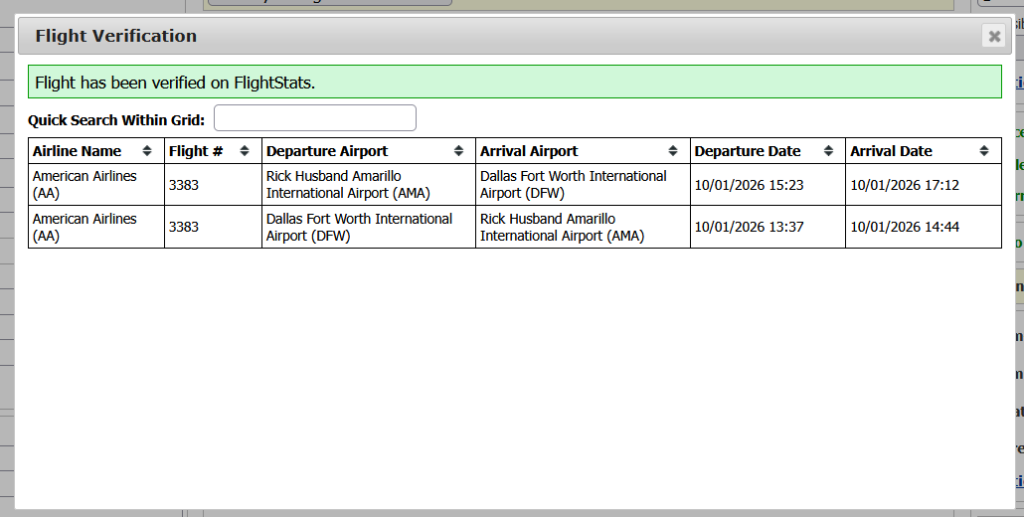
When more than one result is available for the entered airline and flight number, review the departure airport, arrival airport, and travel date before selecting the applicable flight. Airlines may use the same flight number for different routes or directions, so the flight number alone may not identify the correct record.
Why Flight Information May Differ Between Sources
As discussed in Part 1, Limo Anywhere receives flight information through FlightStats. It does not independently generate the underlying airline or airport data.
Differences between sources can occur because:
- One service received an update before another.
- An airline changed the estimated arrival time.
- An airport updated a gate or terminal assignment.
- A flight is listed under multiple codeshare numbers.
- A cancellation or diversion has not reached every system.
- The original source supplied incomplete or incorrect information.
The difference does not automatically identify which system caused the issue. Reviewing the reservation setup, operating carrier, timestamps, and information displayed by each source can help narrow down the discrepancy.
Reporting a Discrepancy to Limo Anywhere Support
Operators should report apparent flight-tracking errors to Limo Anywhere Support, even when the information may have originated with FlightStats or another external source.
A detailed report allows Support to review whether:
- The flight was entered correctly.
- The flight matched and verified properly.
- Limo Anywhere received inaccurate or incomplete information.
- The information was displayed correctly in the reservation or Dispatch.
- The selected flight offset was applied correctly.
- An integration or display adjustment may be possible.
When submitting a flight-tracking issue, include:
- Reservation number
- Airline and flight number
- Date of travel
- Departure and arrival airports
- Marketing and operating flight numbers, if applicable
- The information displayed in Limo Anywhere
- The information displayed by the airline or airport
- Screenshots of both sources
- Approximate time the discrepancy was observed
- Any effect on verification, pickup timing, or Dispatch
Specific examples are more useful than a general report that flight tracking was incorrect. They allow Support to review what information was available and how it moved through the connected systems.
By understanding what the system can automate and when manual follow-up is required, operators can use Limo Anywhere’s flight-tracking tools more effectively across both routine and complex airport reservations.
Recent Posts
Managing Multiple Flights and Troubleshooting Flight-Tracking Issues in Limo Anywhere
Thursday September 24, 2026
Why Customers Still Call Instead of Booking Online
Friday September 18, 2026