Driver Gratuity in Driver Anywhere: Easier Tipping, Clearer Records

Give passengers the option to recognize their chauffeur at payment—and keep the gratuity connected to the reservation, receipt and driver payroll calculation.
Excellent service deserves recognition. But when a passenger wants to leave a tip and does not have cash, a chauffeur needs a straightforward way to include that gratuity in the transaction.
Driver Gratuity in Driver Anywhere brings the choice into the passenger payment flow. When the operator enables the feature and the driver uses a supported app version, the passenger can choose one of the fixed percentage options or enter a custom amount before payment is completed.
Driver Gratuity is available for all payment gateways supported by Limo Anywhere. Your operation chooses whether to allow it for drivers in Company Preferences > Driver Anywhere.
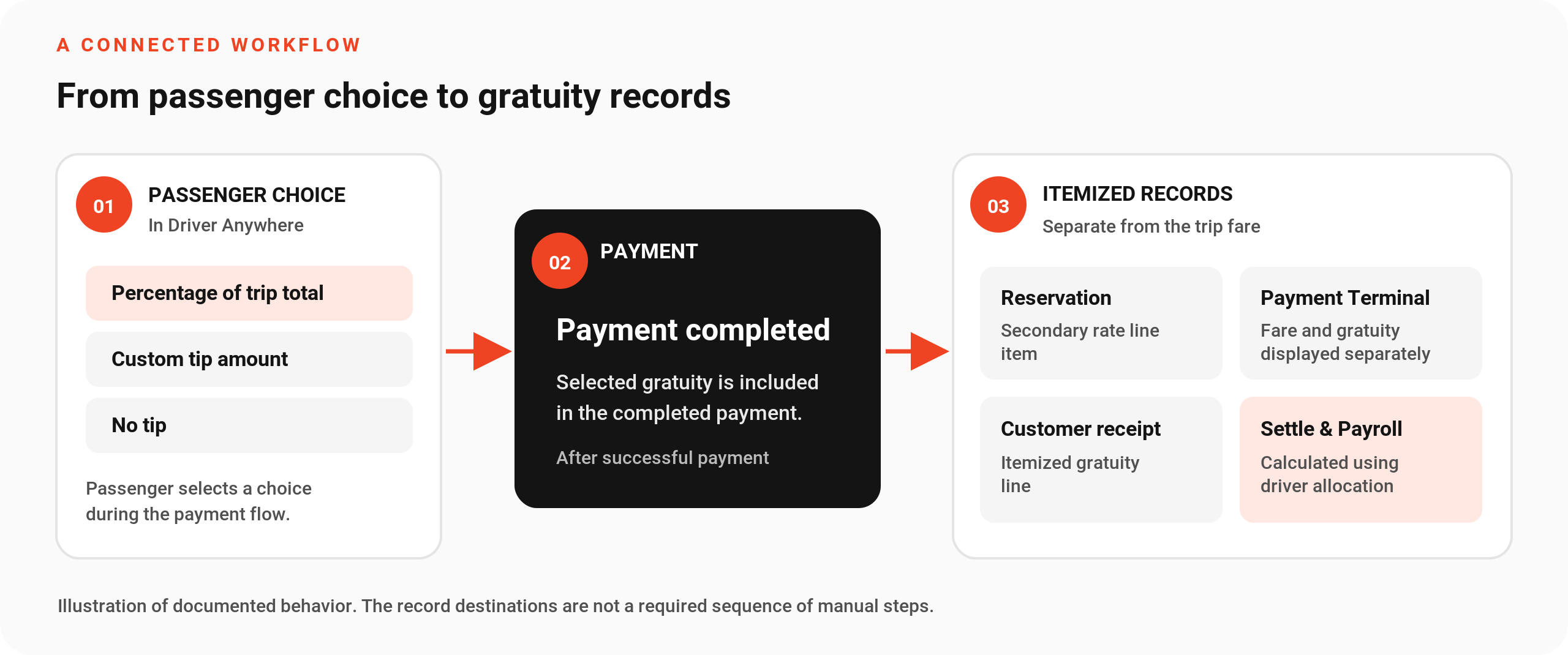
After a successful payment, the collected gratuity is recorded separately from the fare in Limo Anywhere. It appears in the reservation, Payment Terminal, and customer receipt, and is reflected in the Settle screen and Driver Payroll according to the configured allocation.
For passengers, it's a convenient way to say thank you. For operators, it's a better-connected gratuity record.
- Operator-controlled: Enable in preferences
- All payment gateways: Supported by Limo Anywhere
- Passenger choice: Fixed percentages or custom amount
- Connected records: Receipt and driver payroll
One gratuity choice, connected to your operation
This guide covers gratuities added during the Driver Anywhere payment flow.
-
The operator enables gratuity
The operator chooses whether to allow Driver Gratuity for drivers in Company Preferences > Driver Anywhere.
-
The passenger selects a tip
Choose a fixed percentage option, enter a custom amount, or select No tip.
-
The payment creates a record
Once payment succeeds, gratuity is recorded separately in the reservation, Payment Terminal, and receipt, with the configured allocation reflected in settlement and payroll calculations.
Give passengers control over how much to tip
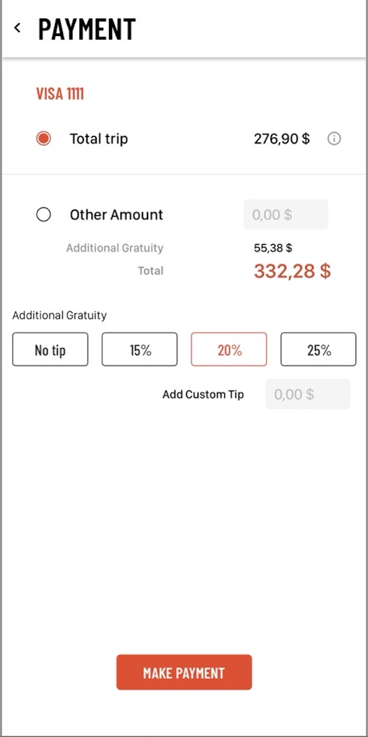
When Driver Gratuity is enabled, the payment screen offers 15%, 20%, and 25% gratuity choices. These preset percentages are fixed in the app and cannot be customized by the operator.
Passengers are not limited to those percentages. They can enter a custom gratuity amount or choose No tip. A selected gratuity is added to the payment before the transaction is completed.
Choose a percentage
Enter a custom amount
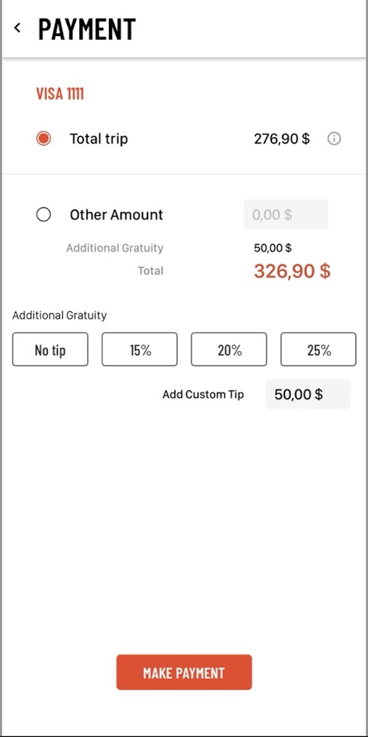
These screenshots show two different gratuity choices: a percentage-based tip and a custom amount. Select either image to view it at full size.
| Example trip amount | $276.90 |
|---|---|
| Custom gratuity selected | +$50.00 |
| Total charged | $326.90 |
In the custom-tip example, the passenger chooses a $50.00 gratuity on a $276.90 trip, bringing the total payment to $326.90. The gratuity amount is the passenger's choice.
Who can benefit from Driver Gratuity?
The most direct fit is an operator who accepts passenger payments through Driver Anywhere. Different operators may value different parts of the workflow.
Airport and point-to-point trips
A passenger appreciative of assistance with luggage or a smooth airport pickup can include a gratuity during payment instead of needing cash.
Hourly chauffeur and events
Clients recognizing attentive service during an event or extended itinerary can enter a custom amount rather than choose a preset percentage.
Growing multi-driver operations
With the gratuity recorded alongside the transaction, the office has a documented amount available for its receipt, settlement, and payroll workflows.
For passengers
An optional way to recognize service during payment, with no cash required.
For office staff
A separately itemized gratuity in the reservation, Payment Terminal, and customer receipt.
For payroll staff
Driver Gratuity carried into the settlement and payroll calculation according to the configured allocation.
How to enable Driver Gratuity
Driver Gratuity is supported on both iOS and Android versions of Driver Anywhere, provided the operator enables the feature and the driver uses a supported app version. Follow these setup and verification steps.
-
Confirm driver payment access.
Confirm that your drivers can process payments through Driver Anywhere. For general access and payment-permission setup, see the official access guide. Driver Gratuity is available across all payment gateways supported by Limo Anywhere.
-
Open Company Preferences > Driver Anywhere.
Select Allow Driver Gratuity to make the option available to your drivers. The operator controls this company preference.
-
Review the rate line item name.
The default name is Driver Gratuity. Operators can change the name used for the rate line item in Limo Anywhere and passenger email communications, including the receipt. For example, use Driver Tip if that fits your company's terminology.
-
Review the driver allocation percentage.
The default is 100% allocated to the driver. This setting determines how much of collected gratuity is included in the driver's payroll calculation. Verify it against your compensation and gratuity policies.
-
Save preferences and run a test.
As a rollout best practice, test the choice during payment and verify the gratuity in the reservation, transaction record, receipt, and settlement/payroll calculation before introducing it across your team.
Enable the setting and name the item

Review driver payroll allocation
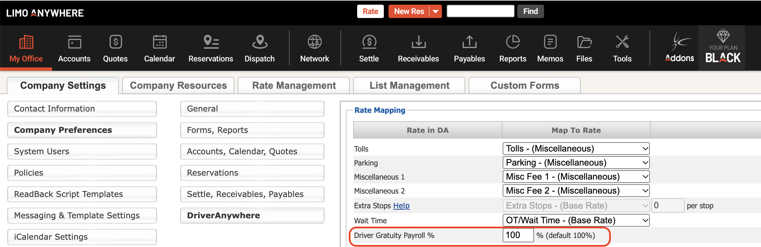
Two percentages, two different purposes.
The fixed percentage a passenger selects determines the tip amount added to the payment; a custom amount is also available. The separate driver allocation percentage determines how much of the collected gratuity is included in payroll. Passenger percentage presets are fixed; the payroll allocation setting is operator-configurable.
Where the gratuity appears
The value of the feature extends beyond the payment screen. Once a payment succeeds, Limo Anywhere records the gratuity separately from the trip fare in these areas.
Reservation · Secondary tab
The collected gratuity appears as a separate rate line item. After collection through Driver Anywhere, that line item is read-only on the reservation.
Payment Terminal
The transaction breakdown shows the fare and Driver Gratuity separately, so staff can distinguish the tip from the trip payment.
Customer receipt
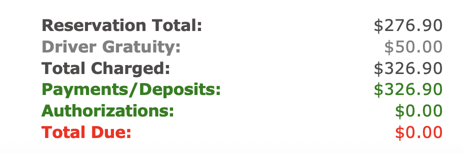
Gratuity is displayed as its own line item using the configured rate line item name, giving the customer an itemized payment record.
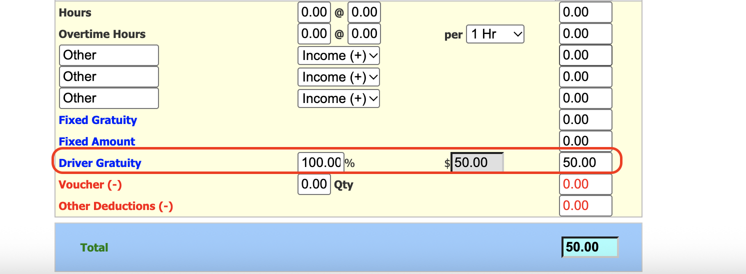
Settle screen & Driver Payroll
Driver Gratuity is reflected in the Settle screen and included in Driver Payroll according to the configured driver allocation percentage. At 100% allocation, the full collected gratuity is included in the driver's payroll calculation.
Receipt amount breakdown
Settle screen allocation
Getting started: Review your gratuity settings with your team and confirm how they fit with your existing payroll and billing processes, especially for prepaid trips and corporate accounts. A quick walkthrough can help your team introduce the feature confidently and provide a consistent passenger experience.
Driver Gratuity FAQs
Is Driver Gratuity supported on iOS and Android?
Yes. Driver Gratuity supports both iOS and Android. Operators must enable the feature, and drivers must use a supported app version. Contact Limo Anywhere Support for help confirming your account setup and app version.
Who controls whether drivers can offer Driver Gratuity?
The operator chooses whether to allow the feature in Company Preferences > Driver Anywhere, using the Allow Driver Gratuity setting.
Is Driver Gratuity available for all payment gateways?
Yes. Driver Gratuity is available for all payment gateways supported by Limo Anywhere. The operator still needs to enable the feature, and drivers need a supported version of Driver Anywhere.
Can operators customize the suggested tip percentages?
No. The 15%, 20%, and 25% choices are fixed in the app. Passengers can enter a custom gratuity amount instead. This is separate from the operator-configurable driver payroll allocation percentage.
Can a passenger choose not to tip?
Yes. The Driver Anywhere payment screen includes a No tip option, alongside the percentage and custom-amount choices.
Can I customize the gratuity name?
Yes. The default rate line item name is Driver Gratuity. Operators can change it in Company Preferences > Driver Anywhere. The configured name is used for that rate line item in Limo Anywhere and passenger email communications, including the receipt.
Can staff change a gratuity after it is collected?
The collected gratuity is read-only in the reservation's Secondary-tab rate breakdown. For refunds, voids, or payment corrections, use your normal Support channel to confirm the appropriate transaction procedure.
What should we check before turning this on?
Review payment permissions, app version, payment setup, allocation percentage and your policies for prepaid or already-gratuity-inclusive work. Complete a test transaction to confirm the resulting records.
Put Driver Gratuity to work
Already a Limo Anywhere customer?
Review your Driver Anywhere preferences, verify payment access, and test the end-to-end workflow with your team. Have questions about your account's setup?
See how payments connect with your business
Exploring Limo Anywhere?
Driver Gratuity is one example of how Limo Anywhere supports the operational work around each trip—from reservation to payment and payroll records.
Related resources:
Recent Posts
Driver Gratuity in Driver Anywhere: Easier Tipping, Clearer Records
Tuesday October 20, 2026
LA 2.0 System Notifications: A Clearer View of What Needs Your Attention
Tuesday October 20, 2026