Limo Anywhere August Product Update: Card Request Notifications, LA 2.0 Improvements, and Faster Follow-Up

limo anywhere august product enhancements


GOOGLE BUSINESS PROFILE TROUBLESHOOTING


A practical, screen-by-screen guide for limo, black car, and chauffeur operators whose Google Business Profile is hard to find—or missing completely.

You claimed your Google Business Profile. You added your hours, uploaded photos, and asked a regular customer for a review.

But when you search for the services you actually sell, your company is still hard to find—or missing completely.

If you are still deciding whether local visibility matters, start with
what happens when someone searches “car service near me.”
This guide assumes you are past that. It is about the next question:


Which screen should you open, and what should you check first?

Google says local results are mainly shaped by
relevance, distance, and prominence.
You cannot eliminate distance or control every competitor in your market. You can, however, make sure your profile accurately represents what you do, where you operate, and whether the business is eligible to appear at all.


Relevance and eligibility

Does Google understand your company as a legitimate match for this search?


Position

Where does Google place you among the businesses it considers a match?

A profile can be set up incorrectly and never become a strong match for the right search. It can also be configured correctly and still rank below closer or more prominent competitors. Those are different problems—and they require different fixes.

00
Start here

Which problem looks like yours?

Work from the top down. There is little value in polishing posts or adding more photos while the profile is unverified, miscategorized, duplicated, or set up under the wrong business model.

If this is happening Check this first Time to review
Your profile does not appear even when someone searches your exact business name Verification, suspension, or ownership status 5 minutes
You appear for wedding searches but not airport or corporate searches—or the reverse Primary business category 10 minutes
Your home address is displayed even though customers never visit it Business location and service-area setup 15 minutes
You appear near your base but disappear farther away Distance and competition—not simply the service-area list Ongoing
Your phone number, hours, category, or other details changed unexpectedly Google updates or third-party data 10 minutes
Two versions of your company appear on Maps Duplicate profiles 15–30 minutes
You appear normally but people are not calling or booking Photos, reviews, website, offer, or conversion—not profile eligibility Separate review

01
Verification

Is the profile still verified and active?

Start here before changing anything else.

Sign in to the Google Account that owns the profile. Search your business name and city—or search “my business.” If Google displays Get verified, a verification problem, a restriction, or an appeal notice, resolve that before working on ranking.

Google determines which verification methods are available. Depending on the business and market, the options may include phone, email, live video, recorded video, or mail. Google says
verification review can take up to five business days
after the required steps are completed.

For service-area businesses, video verification may ask you to show:

  • Street signs, nearby landmarks, or another way to establish where the business is based
  • Vehicles, equipment, business cards, branded clothing, or other proof the operation exists
  • Keys, business documents, or another way to demonstrate that you manage the company

Do not make a string of major edits while verification is already in progress.
Google warns that changing the business name, address, or category while waiting for a mailed verification code can invalidate that code.

For current requirements, see Google’s
video verification guidance.
Google’s interface and available verification methods can change.

02
Business category

Does your primary category match the work you actually sell?

Your category is one of the most important relevance signals you control.

Illustration showing a Google Business Profile primary category field with examples for airport transfers, corporate transportation, and weddings.

Choose the category that best describes the work driving your business. Category names and availability can vary, so confirm them inside your own profile.

Google advises businesses to select the
most specific primary category
that best describes the company, then use only a few additional categories when they are genuinely needed. You cannot invent a category or use the category field as a list of keywords.

For limo, black car, and chauffeur operators, categories commonly found in the picker may include:

  • Limousine service
  • Chauffeur service
  • Airport shuttle service

The right choice depends on what your business primarily does—not the term you would most like to rank for. Category availability also varies by country and can change, so confirm the options shown in your own profile before relying on any list.

Where to find the category setting

Step Where to go What to do
1 Google Search or Maps, signed in as the owner Open your Business Profile
2 Profile controls Select Edit profile
3 Business category Select the edit icon next to Business category
4 Primary category Choose the category that most specifically describes the core business
5 Additional categories Use Add another category only for other meaningful parts of the operation
6 Save Submit the edit and watch for a review or re-verification request

Do not turn the business name into a keyword list

Your Business Profile name should match the name customers see on your website, vehicles, business documents, and other real-world branding.

A name such as “Elite Limo | Airport Car Service | Wedding Limousine | Best in Dallas” is not a category strategy. Google prohibits unnecessary service, location, and marketing language in the business-name field, and violations can lead to a suspension.

Use the category field for the category. Keep the company name as the company name.

Not sure which primary category fits?

The free Google Category Cheat Sheet compares the categories most relevant to airport, corporate, wedding, party-bus, and chauffeur work.


Get the cheat sheet

03
Service area and address

Is the location setup accurate?

Most limo and black car companies are service-area businesses: the company travels to customers, and customers do not visit the office, home, lot, or garage to receive service.

Illustration comparing an overly broad Google Business Profile service area with an accurate service area and hidden home address.

The service-area field describes where you travel. It does not create a location in every listed city or move your business closer to the searcher.

If customers do not visit your address to receive service, Google says the business address should be hidden. A storefront or hybrid business can display its address only when the location is staffed, has appropriate permanent signage, and can receive customers during its stated hours.

Where to review it

Step Where to go What to do
1 Your Business Profile Select Edit profile
2 Location Review Business location
3 Address visibility Hide the address when customers are not served there
4 Service area Add the cities, counties, postal codes, or other supported areas you genuinely serve
5 Save Submit the edit and watch for a verification prompt

Google currently allows
up to 20 service areas
and says the overall boundary generally should not extend more than about two hours of driving time from where the company is based, although some business types may justify a larger area.

A bigger service-area list does not move your business

Adding more cities tells customers where you travel. It does not create a staffed location in each city, move your company closer to the searcher, or override distance as a local-ranking factor.

If you rank near your base but disappear 15 or 25 miles away, the problem may simply be distance and competition.
Expanding the service-area list across half the state is not a reliable way to expand your ranking radius.

Use the service area to describe the operation accurately—not as a substitute for a real location.

Be ready for re-verification

Google says changes to important business information may require re-verification, and category edits can also trigger it. The verification method is selected by Google, not the operator.

Before changing an address or business model, make sure someone is available to complete the process promptly. For a service-area business, that may mean recording an uninterrupted video that establishes the location, the existence of the operation, and your authority to manage it.

04
Profile integrity

Did Google—or an old listing—change the profile?

A Business Profile is not a set-it-and-forget-it record.

Illustration showing outdated directory information feeding an incorrect update into a Google Business Profile and confusing customers.

Fix both places: correct the profile and the outside source carrying the outdated information.

Google says it may update profile information using multiple sources, including user reports and licensed content. That means an outdated phone number, an old address, or inconsistent information elsewhere can reappear even after you corrected the profile.

Review the profile regularly for changes to:

  • Business name
  • Primary and additional categories
  • Phone number
  • Website
  • Address or service area
  • Hours and holiday hours
  • Services

If Google shows a proposed or applied update, correct the profile and then fix the outdated source when you can identify it.

Search for duplicate profiles

Search the business name together with current and former addresses. Then search Maps for older variations of the company name.

Google allows only one Business Profile per eligible business location. A duplicate may be marked as such and stop appearing normally in Search or Maps. If two profiles represent the same business, request a merge rather than creating a third profile or casually deleting one.

Google says reviews are combined when eligible profiles are merged, although owner replies to those reviews may be lost. If the company moved, update the existing profile instead of creating a new one for the new address.

Keep one authoritative version of the business

Use the same real-world business name, accurate location or service-area model, primary phone number, and official website wherever you control the information.

Do not create separate profiles for airport service, wedding transportation, corporate work, and party-bus service when they are all offered by the same company from the same location. Google instructs businesses to list those services on one profile rather than creating a profile for each service line.

05
Measure the change

How to tell whether the fix helped

Do not judge the result by one search from your own phone.

Before changing anything, open
Performance in the Business Profile
and save a baseline. Record the search terms people used to find the profile and the interactions available for your listing, such as views, calls, website clicks, or direction requests.

1

After approval

Confirm the public profile shows the correct category, address visibility, service area, phone number, and website.

2

After one reporting period

Compare search terms with the previous period. Look for relevant airport, corporate, wedding, chauffeur, or limo queries that were previously absent.

3

After two reporting periods

Compare customer actions and visibility while accounting for seasonality, holidays, and changes in demand.

4

If nothing changes

Revisit distance, competition, website relevance, reviews, profile completeness, and whether the business is still correctly verified.

There is no universal ranking timetable. Google says many profile edits appear quickly, but some can take up to 30 days. No legitimate provider can guarantee a specific position, number of calls, or booking total.

06
FAQ

Frequently asked questions

Why is my limo business not showing up on Google Maps?

The most common places to check are verification status, business category, address and service-area setup, profile updates, and duplicate listings. Even when all of those are correct, distance and competition still affect where the profile appears.

Where do I change my primary category?

Open the Business Profile while signed in, select Edit profile, then edit Business category. Choose the most specific primary category that accurately describes the company, add only a few relevant additional categories, and save.

Should I hide my address if I work from home?

Yes, when customers do not visit that address to receive service. In that case, the company should generally be configured as a service-area business. If customers can visit a staffed location with permanent signage during published hours, the business may qualify to display the address.

Is a bigger service area better?

Not as a ranking tactic. The service-area field describes where you travel; it does not make the company physically closer to searchers in every listed city. Keep it accurate and within Google’s guidelines.

Can I change my primary category without losing my reviews?

A category edit changes information on the existing profile; it does not create a new profile. Reviews normally remain. The bigger risk comes from creating duplicates or replacing the original profile unnecessarily.

Why did my profile information change on its own?

Google can apply updates based on information from other sources and user reports. Review profile updates regularly, correct inaccurate fields, and fix outdated information on the source that may have supplied it.

How long should I wait before evaluating a change?

First confirm the edit was approved and published. Some edits appear quickly, while others can take up to 30 days. Verification review can take up to five business days. Use complete reporting periods to evaluate search terms and customer actions rather than expecting a next-day ranking change.

07
Your next step

Start with the setting most likely to be wrong

If the profile is unverified, fix that first. If the business appears for the wrong kinds of searches, review the primary category. If the home address is public or the service area is inaccurate, correct the location model. If details keep changing, inspect Google updates and duplicate profiles.

Get the Google Category Cheat Sheet

Compare the categories most relevant to limo, black car, airport, wedding, party-bus, and chauffeur operators, then review your own profile.


Get the free cheat sheet

Prefer to have the ongoing work managed?

See how Limo Anywhere manages profile optimization, posts, review responses, change monitoring, and monthly local-search reporting.


See the managed service

Sources and Google documentation

Google changes its interface and policies over time. Confirm current field labels and verification requirements before making major profile changes.

Google, Google Maps, and Google Business Profile are trademarks of Google LLC. Limo Anywhere is not affiliated with or endorsed by Google. This article provides general educational information and does not guarantee profile eligibility, ranking, calls, leads, or bookings.

August 12, 2026 · Product Update

Smarter payment follow-up, more of the LA 2.0 experience, and faster customer communication

The latest Limo Anywhere updates give operators a clearer signal when customers complete a Card Request, continue the modernization of the Limo Anywhere experience through LA 2.0, and reduce the wait before an important email can be sent again.

The biggest net-new workflow in this update is a Successful Card Request notification: after a customer uses a secure Card Request link to add a card, Limo Anywhere can notify the operator that the card is now available on the applicable account, trip, or invoice and ready for the next payment step.

This article focuses on customer-facing enhancements and changes worth knowing about. For the complete technical list, including fixes and maintenance updates, visit the Limo Anywhere Release Notes.

Missed our previous updates? Review the July Product Release Update and our article covering better dispatch visibility, passenger confirmations, and workflow reliability.

Highlights at a glance

1
Receive an email when a customer successfully completes a Card Request.
2
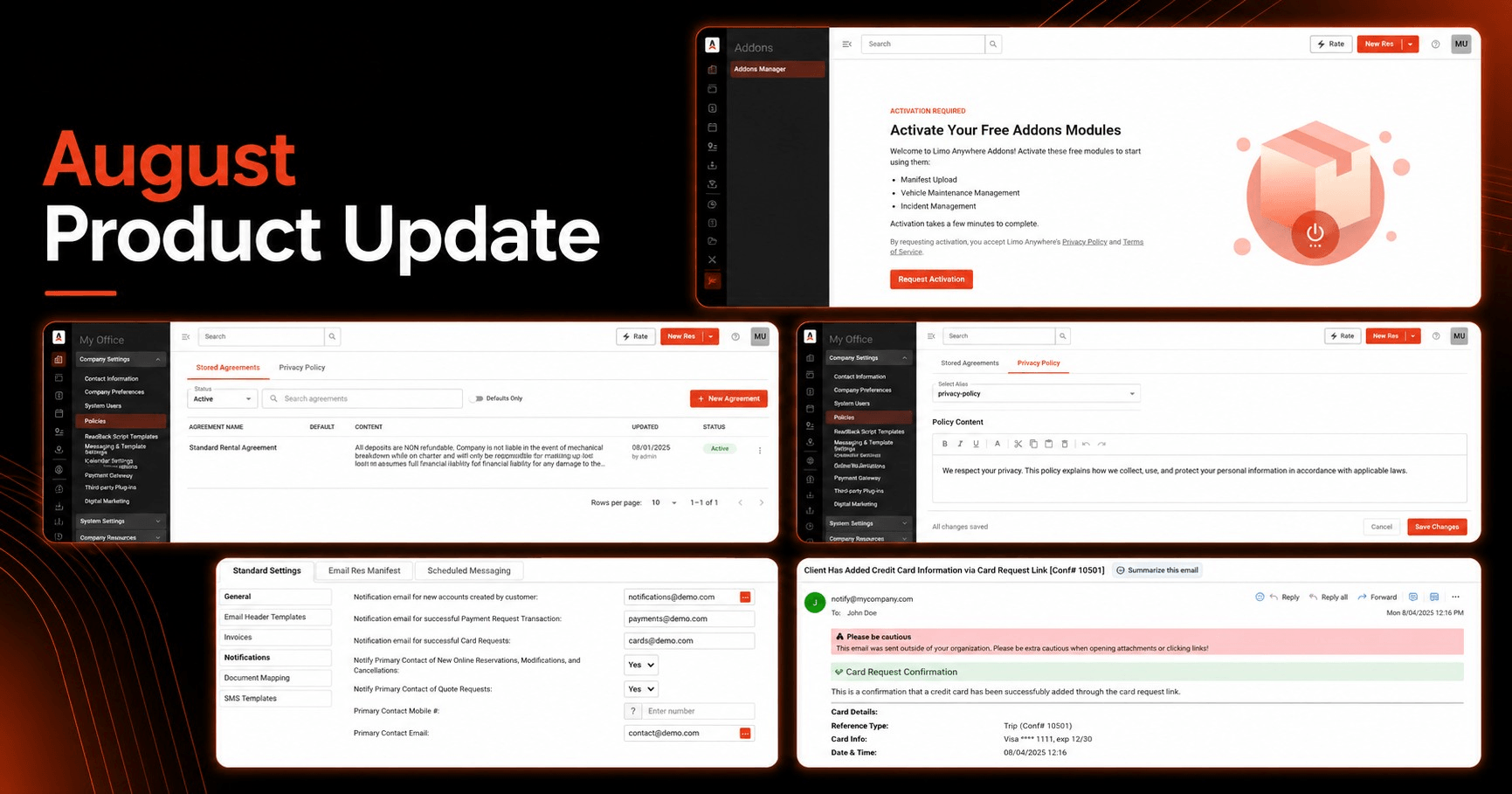
Use new Addons and Policies experiences in LA 2.0 as more of Limo Anywhere moves to the modern interface.
3
Try the New Dispatch Grid and other newer interfaces at app.mylimobiz.com while the classic experience remains available.
4
Resend the same email after five minutes instead of waiting 30 minutes.
5
Prepare for the passenger-facing airport-code transition from PBI to DJT on August 18.

Request a Card

Know when a customer has added a card and it is ready for the next payment step

Operators can now configure an email notification for successful Card Requests.

Request a Card lets operators using the LA Pay Gateway send a customer a secure link to add credit card information. A Card Request can be sent from a reservation, an invoice, or the customer account, and the customer enters the card details through the secure link rather than sharing payment information by phone or email.

Once the customer successfully completes the request, the new notification can automatically email a designated operator address to let the team know that the applicable account, trip, or invoice now has a card on file. That gives reservations and billing teams a clear signal that the customer has completed their part and the card is available when it is time to process the charge.

Where to configure it

My Office → Company Settings → Messaging & Template Settings → Notifications

Operators can configure notification destinations for both Successful Card Requests and Successful Payment Requests. We covered the Payment Request workflow in our earlier article, New Payment Request Confirmation Emails in Limo Anywhere.

Recommended setup

Consider routing these notifications to a monitored reservations or billing inbox instead of one individual employee. A shared inbox makes it easier for the next available team member to see that the card is ready.

For broader notification options, review Setting up Email and SMS Notifications in Limo Anywhere.
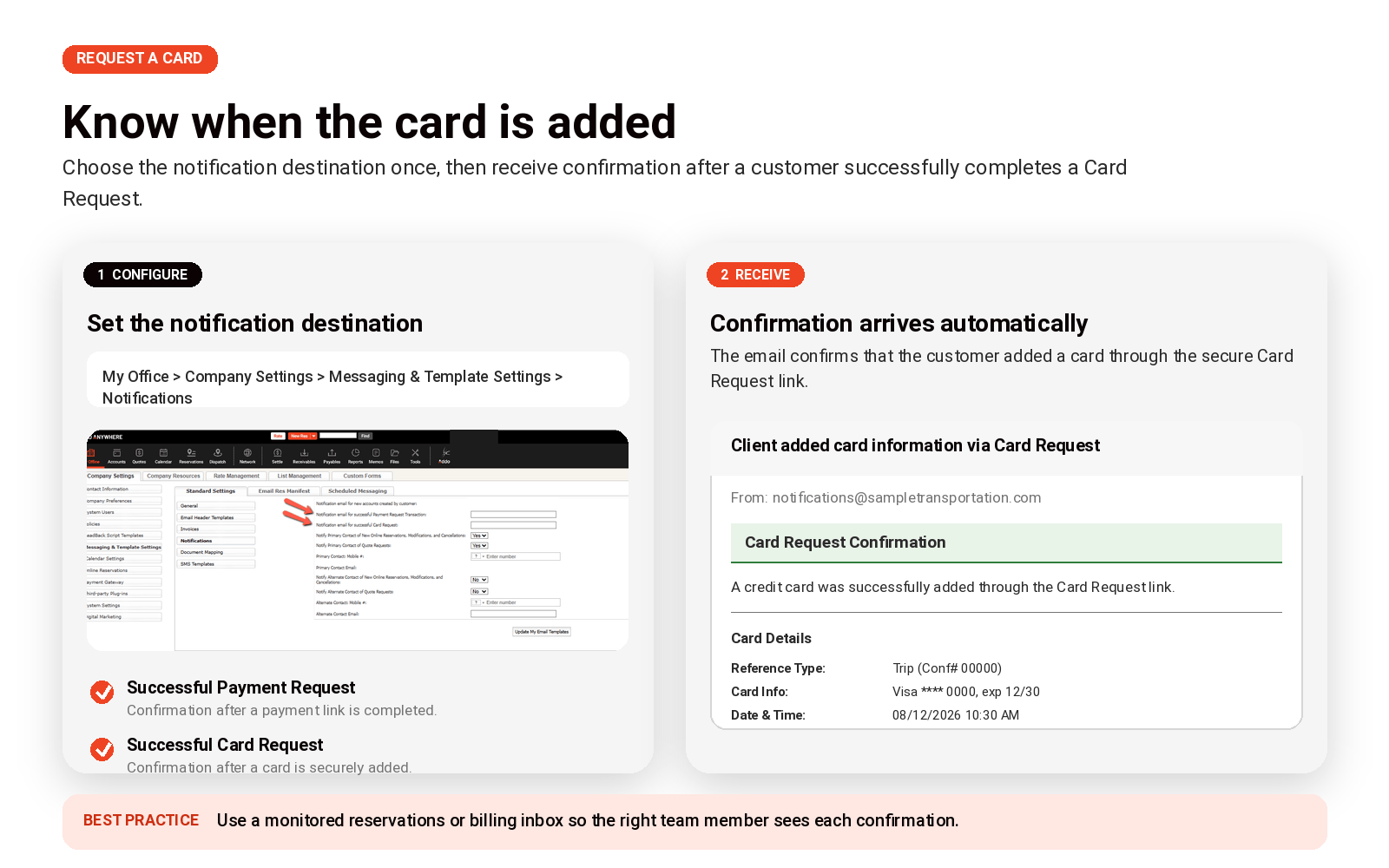

Limo Anywhere notification settings and a sample confirmation email showing that a customer successfully completed a Card Request.
Configure where Successful Card Request notifications are sent, then receive confirmation after the customer adds a card to the applicable account, trip, or invoice.

LA 2.0

More of the modern Limo Anywhere experience is now available in LA 2.0

Limo Anywhere is continuing to modernize the interface customers use every day. The newer experience is available at app.mylimobiz.com, which we refer to here as LA 2.0.

LA 2.0 runs alongside the classic Limo Anywhere experience. Many of the workflows will feel familiar because both experiences connect to the same Limo Anywhere operation, but newer interfaces and product experiences are being introduced in LA 2.0 as we continue moving away from the older UI, UX, and underlying technology.

In this release, the Addons and Policies / Privacy Policy areas are among the latest experiences to receive new LA 2.0 pages. The underlying functionality has not changed; what is new is the updated interface and the ability to handle more of these administrative workflows within the newer experience.

Try LA 2.0 without giving up the classic experience

Use the newest interfaces when they help your team — and switch back when you need to

We encourage operators to spend time in LA 2.0 because that is where the latest interface work is appearing. If a workflow feels unfamiliar or your team prefers the classic view for a particular task, the classic Limo Anywhere interface remains available at manage.mylimobiz.com.

If you have not tried LA 2.0 yet, start with New Dispatch

The New Dispatch Grid is one of the clearest examples of where the LA 2.0 experience is headed. It gives teams a more modern dispatch workspace with features such as saved presets and tabs, Attention Flags, list and map views, and batch editing for multiple trips.

You do not have to rebuild your dispatch process all at once. Start with one useful view your team already needs — such as Today’s Trips, Payments Due, Farm-Out Trips, VIP clients, or a vehicle-specific view — and build from there.

What changed in Addons and Policies?

These are UI/UX modernization updates, not new functionality. The Addons and Privacy Policy experiences now have updated pages in LA 2.0, giving customers more opportunities to stay in the newer interface as Limo Anywhere continues its modernization work.

Email workflow

Resend important emails sooner

Limo Anywhere maintains a safeguard intended to prevent users from accidentally sending the same email repeatedly. The waiting period associated with that safeguard has now been reduced from 30 minutes to five minutes.

Users can resend an email when at least one of these conditions is met:

  1. Five minutes have passed since the previous email was sent.
  2. The recipient’s email address has been changed in the Email/Fax Confirmation window.
  3. Applicable reservation details have been updated.
PREVIOUS WAIT
30 min

NEW WAIT
5 min

When a customer needs the same confirmation again or a staff member needs to follow up quickly, the team no longer has to wait 30 minutes before resending the message.

This gives reservations and customer-service teams more flexibility while preserving protection against immediate accidental duplicates. Staff should still review the recipient, reservation details, forms, and attachments before resending any customer communication.

Operational notice

PBI changes to DJT on August 18

President Donald J. Trump International Airport’s passenger-facing IATA code will change from PBI to DJT on August 18, 2026.

Because the passenger-facing code is changing — not just the airport name — this transition matters to reservation, customer-communication, and dispatch workflows. Passengers should continue using PBI when searching for flights, checking baggage information, or viewing airline schedules through August 17. Beginning August 18, airlines and passenger-facing travel systems will use DJT.

The change does not represent a new airport or a change in airport location, routes, schedules, or passenger services. Airport operations will continue normally.

Limo Anywhere’s airport reference information has been updated to reflect the airport’s new name and the scheduled IATA-code transition.
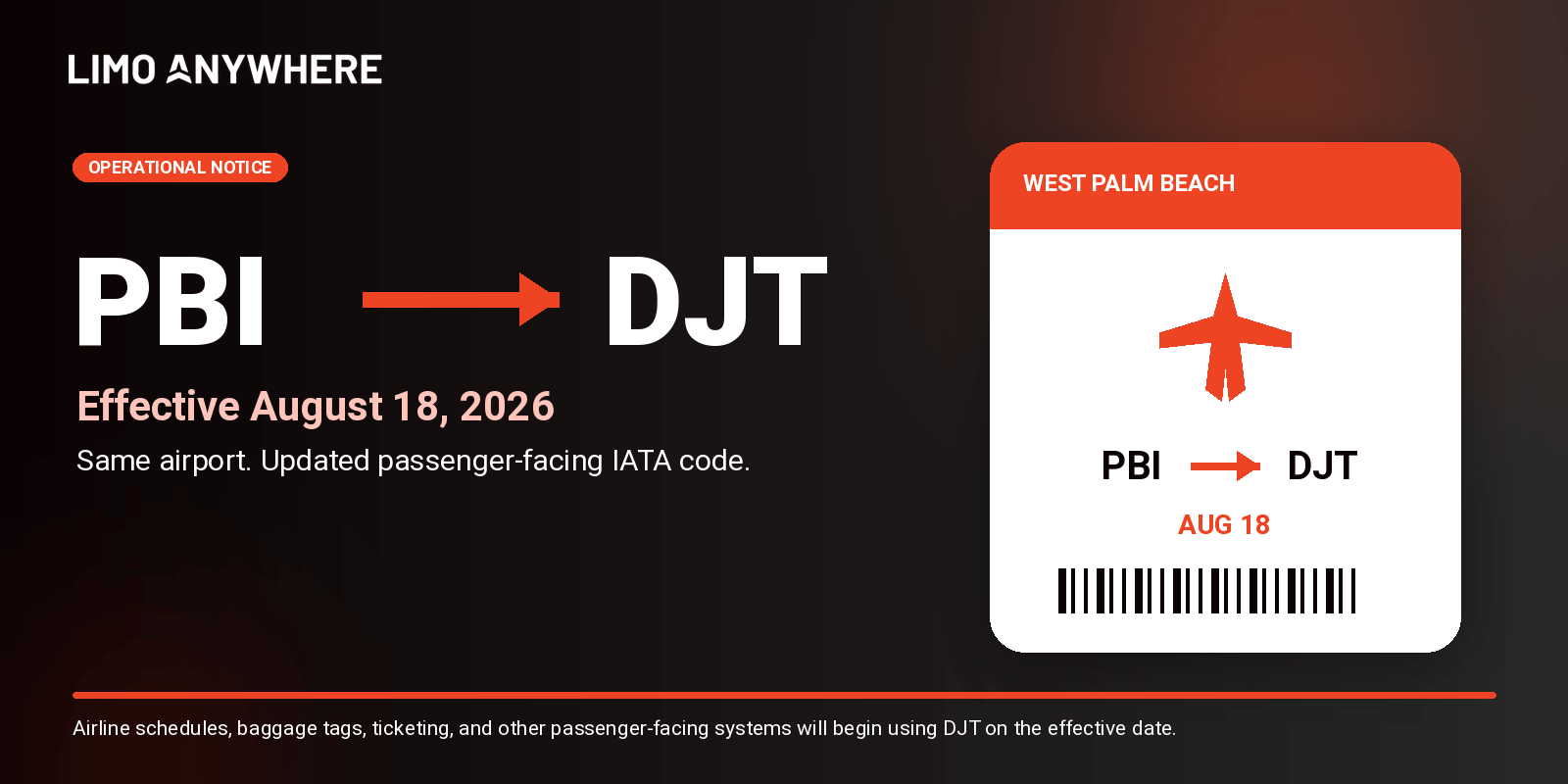

PBI airport code changes to DJT effective August 18, 2026.
The passenger-facing IATA code changes from PBI to DJT on August 18, 2026. The airport and its services remain in the same location.

What operators should do

  • Review reservations scheduled on or after August 18 that involve the airport.
  • Prepare reservations and dispatch staff for customers to use either PBI or DJT during the transition.
  • Check saved pickup instructions, templates, and internal documentation that manually reference PBI.
  • Continue using PBI for passenger-facing airline information through August 17 and begin recognizing DJT on August 18.

For the latest transition details, review the airport’s official Name Change FAQs.

What to do next

Four quick checks for your team

Reservations & billing

Configure the Successful Card Request notification and route it to the team that needs to know when a card is available to charge.

LA 2.0 users

Spend time at app.mylimobiz.com and try the newer interfaces — especially New Dispatch. Use the classic experience when your team needs it.

Customer-service teams

Make sure staff know the duplicate-email safeguard is now five minutes instead of 30.

South Florida operators

Prepare staff and future reservations for the PBI-to-DJT passenger-code transition on August 18.

Need help?

Explore LA 2.0, review the full release notes, or contact Support

Try the latest Limo Anywhere interfaces, visit the Knowledge Center for setup guidance, or contact our Support team if you have questions about your account.

The goal of these updates is straightforward: give operators better visibility into customer actions, continue moving everyday work into a more modern Limo Anywhere experience, and reduce unnecessary friction in common communication workflows.

Feature availability may vary based on account configuration, package, payment gateway, enabled Addons, and rollout status. If you have questions about an individual workflow, contact Limo Anywhere Support.

Scroll to Top